Healthcare
B2B - Full Development
United States
iOS (Live)
Most people do not go to the dentist until something hurts. By then, the problem is already serious and the treatment is expensive. The reason is not laziness, it is that people cannot see what is happening inside their own mouth, and when they do visit a dentist, the terminology and the X-rays make no sense to them. They leave confused, agree to whatever is recommended, and often feel they paid too much for something they did not understand.
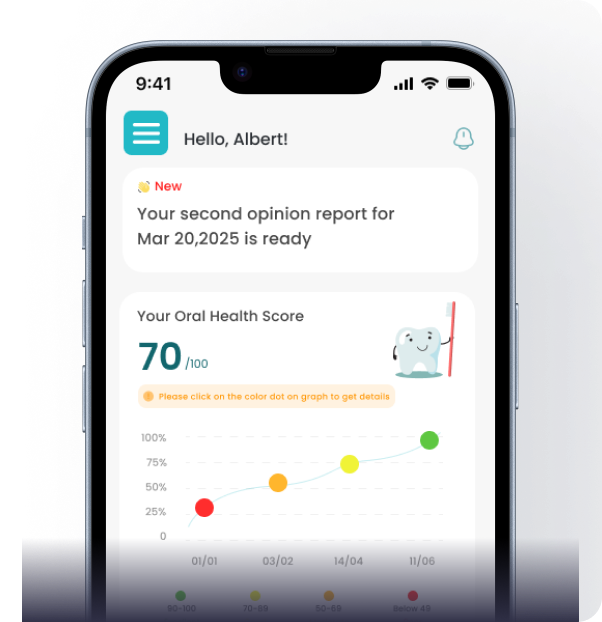
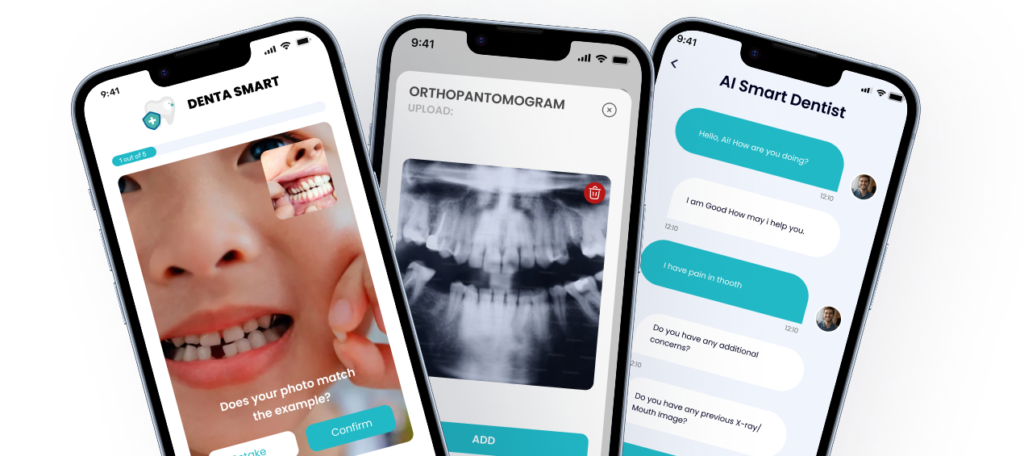
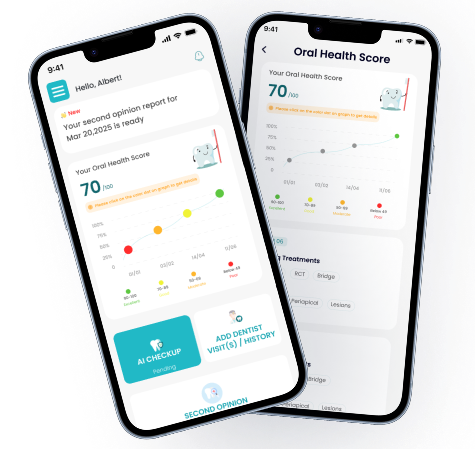
Client wanted to build a product that gives people a way to understand their own dental health. The idea: a person takes a photo of their teeth or uploads an X-ray. An AI analyses the image and explains what it sees in plain language. The user gets an Oral Health Score, a list of things that need attention, and guidance on what to ask the dentist about. The app does not replace the dentist, it prepares the user for the visit so they are not walking in blind.
First, the client wanted a 3D model of a full set of teeth, upper and lower jaw, that users could rotate, zoom, and tap on to select individual teeth or areas where they felt pain. Flutter does not have a built-in 3D rendering engine. There is no Flutter widget that draws a realistic 3D teeth model. This had to be built in native code.
AI that analyses dental photos and X-rays had to be trained on real dental data. The model needed to detect cavities, gum recession, discoloration, bone loss, and other conditions from a photo taken on a phone camera, not a clinical imaging device. Training this model was a separate ML engineering problem from building the app that uses it.
App needed to handle a situation that most health apps ignore: the line between AI and human. When should the AI give a direct answer, and when should it say ‘you need to see a dentist for this’? Getting this wrong in either direction is dangerous, too confident and the user skips a visit they needed, too cautious and the app feels useless.
This project had two engineering teams working on different parts of the same product.
ML engineers trained the dental AI model. They worked with dental data, X-rays, intraoral photos, clinical annotations, to build the model that analyses images and returns findings. This is the intelligence behind the Oral Health Score, the cavity detection, the gum assessment, and the condition identification.
Engineers built everything else: the Flutter app for iOS and Android, the native 3D teeth model on both platforms, the integration layer that connects the Flutter app to the AI model, the Firebase backend, the user flows, the symptom checker, the Dr. Din AI chat assistant, and the subscription system.
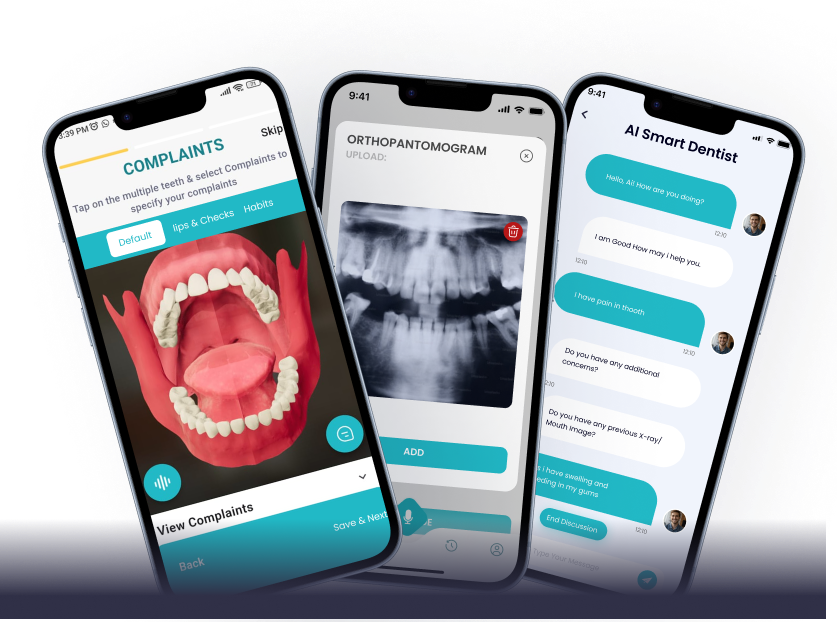
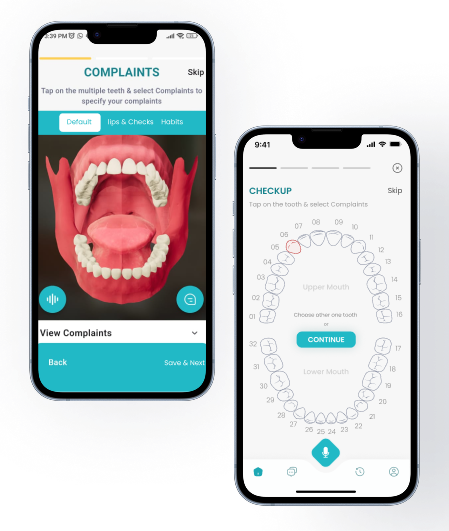
The 3D teeth model is the first thing a user sees when they open DentaSmart. A full upper and lower jaw, rendered in 3D, that the user can rotate with their finger, zoom in on, and tap to select a specific tooth. The selected tooth highlights, and the app moves to the next step, describing the area, asking about symptoms, or starting an AI analysis.
Flutter cannot do this. Flutter draws 2D UI elements, text, buttons, cards, lists. It does not have a 3D rendering engine built in. There is no Flutter widget for rendering a detailed 3D dental model with per- tooth tap detection and smooth rotation.
Team built the 3D model natively. On Android, the model was built using SceneView, Android’s 3D rendering framework based on OpenGL ES. On iOS, the equivalent was built in Swift using SceneKit. Each tooth in the model is a separate selectable object. When a user taps a tooth, the native layer identifies which tooth was tapped, highlights it visually, and sends the tooth ID back to the Flutter layer through a Platform Channel.
The Flutter app receives the tooth ID and takes over from there, loading the relevant symptom flow, condition information, or AI analysis for that specific tooth. The 3D model handles the visual and interaction layer. Flutter handles everything after the selection.
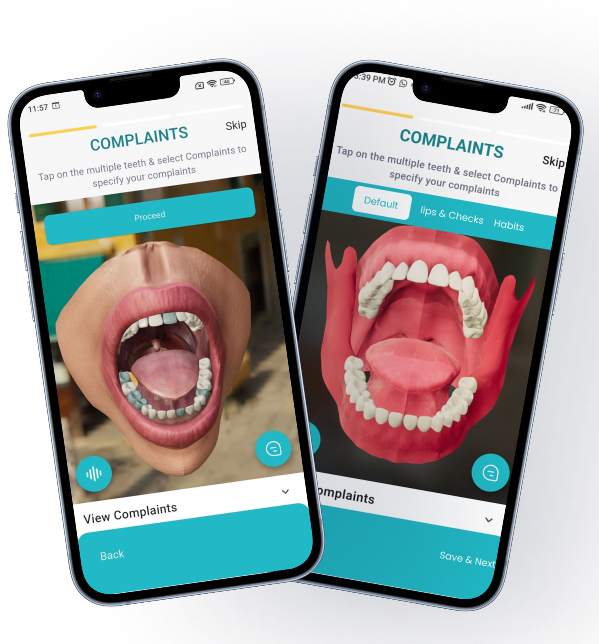
Photo analysis
Cross-platform iOS app development
Native watchOS companion app, required because Flutter has no watchOS support
Native Android bridge code
Cross-platform iOS app development
Native watchOS companion app, required because Flutter has no watchOS support
Native Android bridge code
Auth, Firestore database, Cloud Messaging (push notifications)
Firebase Cloud Functions, persona identification, session triggers, notification logic
Cloud infrastructure, function hosting, AI model serving
Auth, Firestore database, Cloud Messaging (push notifications)
Firebase Cloud Functions, persona identification, session triggers, notification logic
Cloud infrastructure, function hosting, AI model serving
Scans analyzed
App Store rating
iOS App Store
DentaSmart launched on the iOS App Store in October 2025 and is now on version 1.7. The app holds a 5.0 rating on the App Store. The product’s own website reports more than 50,000 scans analysed and a 4.8 out of 5 average user rating. Android is in early access with a public waitlist.
User testimonials on the DentaSmart website describe the three outcomes the product was built to deliver: understanding what is happening before visiting the dentist, avoiding unnecessary procedures by getting a second perspective, and knowing costs before agreeing to treatment.
ETechViral delivered the complete app: the Flutter codebase for iOS and Android, the native 3D teeth model on both platforms with per-tooth selection, the integration of Zigron’s dental AI model into the Flutter app, the Dr. Din AI assistant, the symptom checker, the scan history and tracking system, the subscription and payment flow, the Firebase backend, and the App Store submission. Zigron’s ML team trained and maintained the dental AI model that powers the analysis.