Case Study

Finden: AI-Powered File Search and Workspace Product

Industry

SaaS

Project Type

Full Development

Location

Singapore

Deliverable

Website

The Problem

Most people who work on a computer have the same problem: their files are everywhere. A document started in Google Drive. A version of it was shared over WhatsApp. A related spreadsheet is in OneDrive. An email about it is in Gmail. A comment on it is in Slack. When they need to find something, they open four apps, search in each one separately, and still are not sure they found the right version.

This gets worse when someone manages multiple accounts. A person with two Google accounts, one personal, one work, has two separate Drives that do not talk to each other. Searching across both at the same time is not possible natively. The same problem exists for teams: different people save things in different places, and there is no single place to look.

The client identified this as a problem worth building a product around. The question was: can you give someone one place where all their connected storage lives, and let AI handle the work of finding, organising.

 A workspace where you connect your storage services once, and after that you can search, ask questions, and organise files across all of them from a single interface.

What We Built

ETechViral built the full Flutter application for mobile and web, and the Firebase and Google Cloud backend.

Flutter runs the frontend across all three platforms from a single Dart codebase. Firebase handles authentication, the database, and server-side functions. Google Cloud hosts the AI model and the vector search infrastructure that powers the semantic file search. Kotlin and Swift handle the one thing Flutter cannot do natively: watching local folders on the device for file changes.
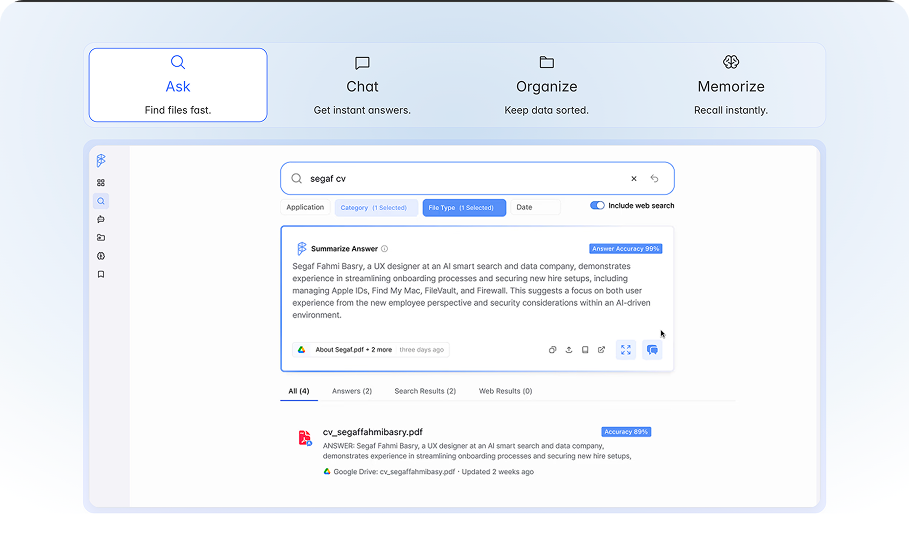
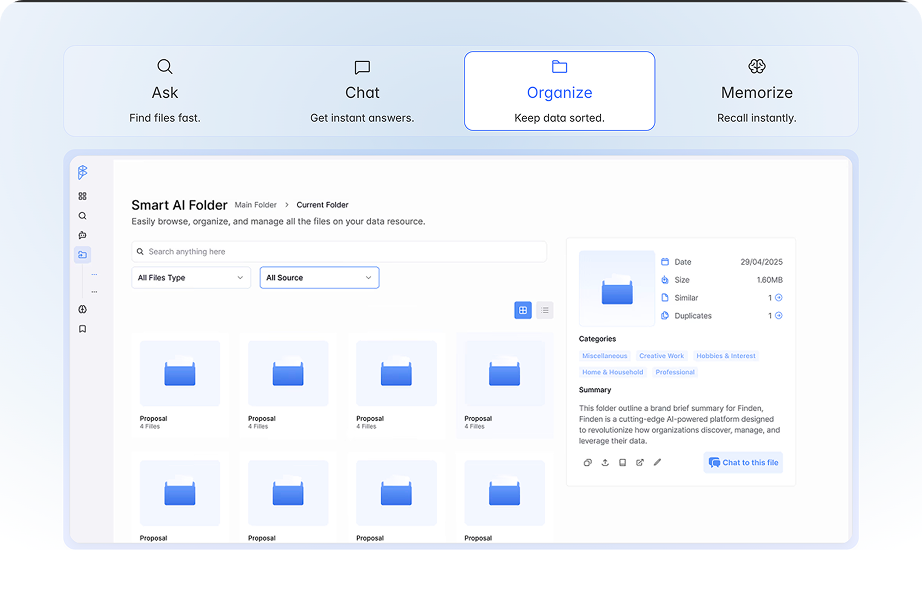
Ask questions and get answers

The user can ask questions in plain language, what is the status of the Singapore proposal?’ or ‘find the invoice from last November and get an answer with the relevant files attached. The AI reads the indexed content and returns a direct answer, not just a list of files to open and check manually.

Watch local folders

The user picks a folder on their phone or computer. Finden watches it. Any file added to that folder is indexed automatically. Changes to existing files update the index. The folder behaves like a connected source the same way a cloud drive does, the only difference is that it lives on the device.

Remember context

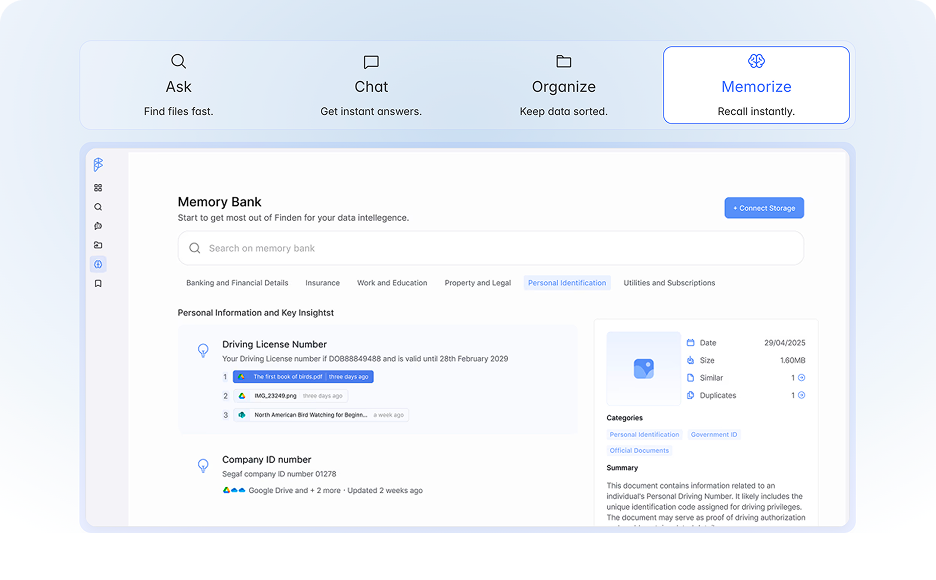
Finden can store things the user wants to remember, a decision made, a fact noted, a task assigned, and surface that information later when it is relevant. This works across sessions. Information noted in one conversation is available in a later one without the user having to re-explain it.

What Made This Build Complex

Connecting multiple third-party services, each with its own OAuth flow
Finden currently integrates with Google Drive, Gmail, OneDrive, SharePoint, Microsoft Teams, Dropbox, Slack, Jira, Confluence, Notion, WhatsApp, and Microsoft Outlook. Each of these services has its own authentication system, its own API, its own data model, and its own rate limits.
Each integration had to be built, tested, and maintained separately. When a user connects a service, the token has to be stored securely, refreshed when it expires, and revoked cleanly when the user disconnects. If the token refresh fails silently, the user gets stale search results and no error message. Getting this right across a dozen services is a significant piece of ongoing engineering work, not a one-time task.
Multiple Accounts for The Same Service
Real users often have two Google accounts, personal and work. Finden supports connecting multiple accounts from the same provider. This means the token storage, the indexing pipeline, and the search system all have to handle the same user having two separate Google Drive connections simultaneously without mixing data between them.

Watch folders on the local device

Finden can watch folders on the user’s local device and index their contents. When a file is added, changed, or deleted inside a watched folder, the index updates automatically.


Flutter does not have native support for watching the local file system. The Flutter file system APIs can read files but they cannot register a listener that fires when the file system changes. This required writing native platform code: Kotlin on Android and Swift on iOS. The native code monitors the folder using the platform’s own file observer APIs, then sends events back to the Flutter layer through a platform channel when changes happen.

Why this needed native code
On Android, the native FileObserver class watches a directory and fires callbacks for creation, modification, deletion, and rename events. Flutter’s file APIs have no equivalent. The Kotlin layer handles the watching and sends structured events to Flutter over a MethodChannel. The same pattern was implemented in Swift using NSFilePresenter on iOS. This is why Kotlin and Swift are in the tech stack despite the app being built primarily in Flutter.
Semantic search across different file types and sources

A basic keyword search returns files where the search term appears in the file name or content. Finden’s search goes further, you can ask it a question in plain language and it returns the right files even if they do not contain those exact words. A query like ‘show me the Q3 budget discussion’ finds the right file even if the file is called ‘Finance Review Oct.pdf’.

This works through vector search. When a file is indexed, the content is processed by an AI model running on Google Cloud that converts it into a vector, a numerical representation of its meaning. These vectors are stored. When a user runs a search query, the query is also converted to a vector, and the search finds files whose vectors are closest to the query vector. Files with similar meaning come up, not just files with matching words.

AI queries that never touch the user’s data
Finden’s AI runs queries against the user’s files without those files ever being sent to a shared AI model. The queries go to a private AI model. The documents themselves are never stored on Finden’s servers in a way that could be used for training.
Google CASA 2 security certification
CASA stands for Cloud Application Security Assessment. It is a third-party security audit run by a lab approved by the App Defense Alliance. Passing CASA Tier 2 means an independent security firm has reviewed the application’s integration with Google APIs, tested it against a defined set of security requirements, and confirmed it meets those requirements.
Running on three platforms from one Flutter codebase
Flutter can run on iOS, Android, and web from a single Dart codebase, but that does not mean the same code works identically on all three without any platform-specific handling. The web build has different rendering constraints from the mobile builds. File picker behaviour is different on web versus mobile. The OAuth redirect flow is different on web because there is no app scheme to redirect back to.

Technology Stack

Flutter

Cross-platform iOS app development

Swift

Native watchOS companion app, required because Flutter has no watchOS support

Kotlin

Native Android bridge code


Flutter

Cross-platform iOS app development

Swift

Native watchOS companion app, required because Flutter has no watchOS support

Kotlin

Native Android bridge code

Firebase

Auth, Firestore database, Cloud Messaging (push notifications)

TypeScript

Firebase Cloud Functions, persona identification, session triggers, notification logic

Google Cloud

Cloud infrastructure, function hosting, AI model serving

Firebase

Auth, Firestore database, Cloud Messaging (push notifications)

TypeScript

Firebase Cloud Functions, persona identification, session triggers, notification logic

Google Cloud

Cloud infrastructure, function hosting, AI model serving

What Came Out of it

300K+

Documents processed

Google CASA 2

Security certified

Live

Website

Finden is live on iOS, Android, and web. It has indexed over 300,000 documents across its user base. It has passed the Google CASA 2 security audit and holds the Microsoft Defender partnership. User reviews on Product Hunt and G2 consistently mention the same things: finding files faster, managing multiple accounts in one place, and searching WhatsApp alongside cloud storage.

ETechViral built the complete product, the Flutter app across mobile and web, the Firebase backend, the Google Cloud AI and search infrastructure, the native Kotlin and Swift watch folder implementations, and the OAuth integration layer for all connected services. The product is maintained and extended as an ongoing engagement.

Building a product that connects to third-party services and needs to work on mobile and web?

Building a product that connects to third-party services
and needs to work on mobile and web?

ETechViral builds Flutter apps for web and mobile with Firebase and Google Cloud backends. We handle complex integrations, native platform code, and production-ready deployments.

More Case Studies

Apollo.ai: Board Management Platform

Apollo.ai A board management platform that handles agendas, resolutions, decision tracking, and document storage for executive teams. EU-hosted, ISO 27001 and GDPR compliant. Clients report saving 10+ hours per meeting.

Skybell: Video Doorbell

SkyBell Companion app for SkyBell’s video doorbell hardware. Delivers live HD video, two-way audio, and door alerts to any device. AI facial recognition and custom motion zones cut false alerts by up to 95%.