Flutter App Testing: Unit, Widget and Integration Tests Explained
Flutter app testing covered in full: unit, widget, and integration tests with mocktail, bloc_test, and integration_test, plus CI/CD pipeline integration.
Flutter app testing relies on three types of automated tests, unit, widget, and integration, each catching a different class of bug before it reaches production. Shipping a Flutter application without automated tests is not moving fast, it is deferring the cost of every bug to the worst possible moment. A bug caught in a unit test costs a developer five minutes. The same bug caught in production costs a support ticket, a hotfix release, an App Store review cycle, and the trust of every user who encountered it.
- Flutter has three testing layers: unit (business logic), widget (UI in isolation), and integration (full user flows on a real device or emulator).
- Use
mocktailormockitofor mocking dependencies;bloc_testfor Bloc event/state sequences;integration_testfor device-level flows. - Golden tests catch visual regressions automatically by comparing rendered widgets to saved reference images.
- Realistic coverage targets: 90%+ on the Domain layer, 70-80% on Data, 60-70% on Presentation, and integration tests on every revenue-impacting flow.
- Tests run on every pull request in GitHub Actions; failing tests block the merge.
Flutter has one of the most complete testing frameworks of any mobile development platform. Unit tests, widget tests, and integration tests are all first-class citizens, supported by the Flutter SDK, documented by Google, and executable in CI without a device. The question is not whether to test Flutter applications. It is how to test each layer correctly and what realistic coverage looks like for a production codebase. The official Flutter testing documentation and the mocktail package on pub.dev are the canonical references.
This article covers the complete Flutter testing picture, what each testing layer is for, how to write each type with real code examples, how to mock dependencies cleanly, and how testing connects to the CI/CD pipeline that runs it automatically.
This article is part of our Complete Guide to Flutter App Development. Testing in Flutter is inseparable from architecture, the reason Clean Architecture makes testing easy is precisely because each layer has no external dependencies by design. Once your tests are written, they run automatically in your CI/CD pipeline, our Flutter CI/CD guide covers how to configure GitHub Actions to run the full test suite on every pull request. Testing discipline matters most where failures are regulated, and our Flutter healthcare app development guide covers the compliance-driven test trail.
Ready to build? Our Flutter development team is available for a free consultation.
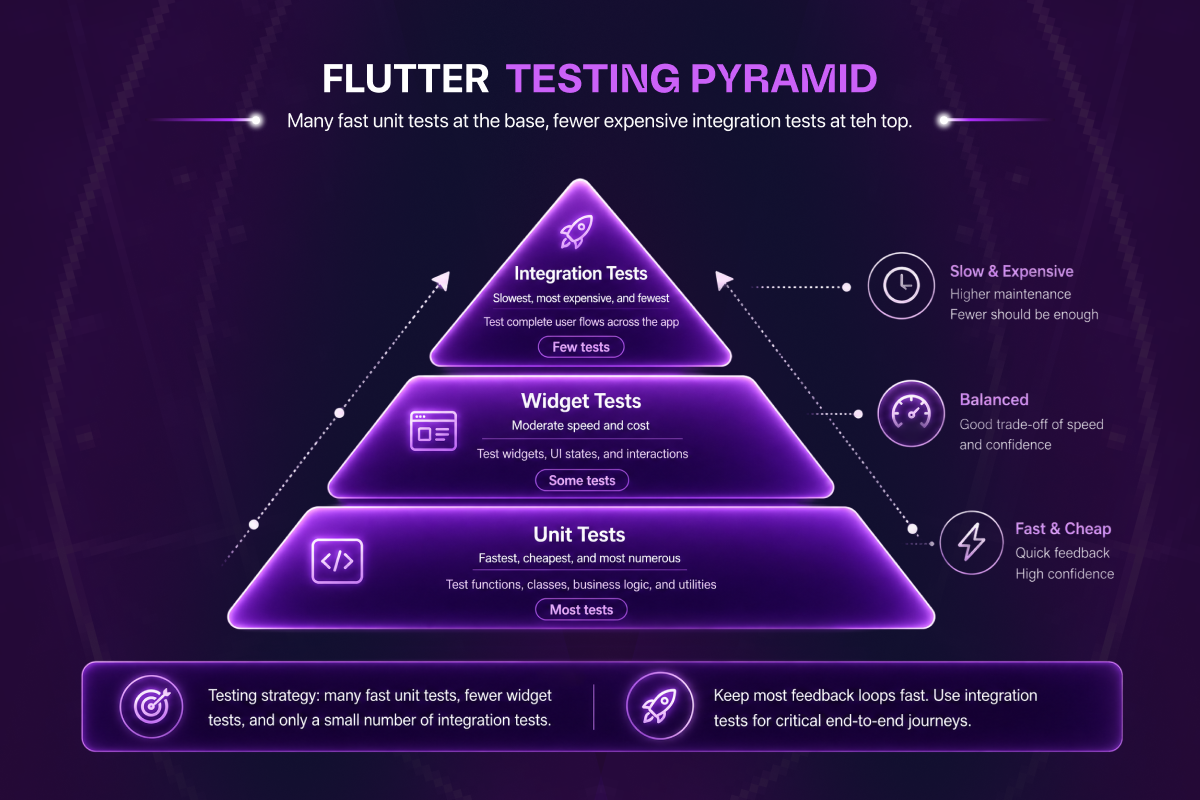
Diagram: the Flutter testing pyramid. Many fast unit tests at the base, fewer expensive integration tests at the top.
The Three Testing Layers in Flutter
Flutter's testing framework is organised into three distinct layers, each serving a different purpose and operating at a different level of isolation.
| Test type | What it tests | Speed | When to use |
|---|---|---|---|
| Unit | A single function, method, or class (business logic) in isolation | Fastest (milliseconds) | Core logic, calculations, and edge cases. The bulk of your tests |
| Widget | One widget's UI and interaction, without a full app | Fast (sub-second) | Rendering, layout, and tap or scroll behaviour of components |
| Integration | A complete user flow across the real app on a device or emulator | Slowest (seconds to minutes) | Critical end-to-end journeys such as login or checkout before release |
Unit tests, test a single function, class, or method in complete isolation from all external dependencies. Fast to run, zero infrastructure required, no device needed. The foundation of any Flutter test suite.
Widget tests, test a single widget or a small widget subtree in a simulated environment. No real device or emulator required. Verifies that widgets render correctly and respond to interactions as expected.
Integration tests, test complete user flows on a real device or emulator. Slow to run, require a connected device or emulator, hit real or staging infrastructure. Catches problems that no unit or widget test can find.
A well-structured Flutter test suite uses all three layers, but not in equal proportion. The testing pyramid applies: many unit tests, fewer widget tests, a small number of carefully chosen integration tests covering the highest-value user flows.
Unit Testing in Flutter, Testing Business Logic
Unit tests are the fastest, cheapest, and most valuable tests in a Flutter codebase. They test a single unit of logic, a use case, a Bloc event handler, a data transformation function, in complete isolation from the network, the database, the device, and the widget tree.
The flutter_test Package
The flutter_test package is included in every Flutter project by default. For pure Dart logic that has no widget dependency, the standard test package is sufficient and slightly lighter. Both use the same test(), group(), and expect() API.
# pubspec.yaml
dev_dependencies:
  flutter_test:
    sdk: flutter
  mocktail: ^1.0.0  # or mockito: ^5.0.0
Mocking Dependencies, Mocktail vs Mockito
Unit tests require isolating the unit under test from its dependencies. A GetUserUseCase test should not make a real HTTP request, it should receive a controlled response from a mock repository. The two standard mocking packages in Flutter are mockito and mocktail.
Mockito uses code generation, you annotate a class with @GenerateMocks and run build_runner to generate the mock class. More setup, but the generated mocks have full type safety.
Mocktail does not require code generation, mocks are created at test time by extending Mock. Less setup, faster to get started, functionally equivalent for most use cases.
This article uses mocktail for all examples.
Unit Testing a Use Case
// test/domain/usecases/get_user_usecase_test.dart
import 'package:flutter_test/flutter_test.dart';
import 'package:mocktail/mocktail.dart';
import 'package:dartz/dartz.dart';

import 'package:my_app/domain/entities/user.dart';
import 'package:my_app/domain/repositories/user_repository.dart';
import 'package:my_app/domain/usecases/get_user_usecase.dart';

class MockUserRepository extends Mock implements UserRepository {}

void main() {
  late GetUserUseCase useCase;
  late MockUserRepository mockRepository;

  const tUserId = 'user-123';
  const tUser = User(id: tUserId, name: 'John Doe', email: 'john@example.com');

  setUp(() {
    mockRepository = MockUserRepository();
    useCase = GetUserUseCase(repository: mockRepository);
  });

  group('GetUserUseCase', () {
    test('returns User when repository call succeeds', () async {
      // Arrange
      when(() => mockRepository.getUser(tUserId))
          .thenAnswer((_) async => const Right(tUser));

      // Act
      final result = await useCase(tUserId);

      // Assert
      expect(result, const Right(tUser));
      verify(() => mockRepository.getUser(tUserId)).called(1);
      verifyNoMoreInteractions(mockRepository);
    });

    test('returns Failure when repository throws', () async {
      when(() => mockRepository.getUser(tUserId))
          .thenAnswer((_) async => Left(ServerFailure('Network error')));

      final result = await useCase(tUserId);

      expect(result, isA<Left<Failure, User>>());
    });
  });
}
Notice what this test does not contain: no HTTP client, no database, no Flutter widgets, no device. It runs in milliseconds and tests exactly one thing, whether the use case correctly delegates to the repository and returns the result.
Unit Testing a Bloc
The bloc_test package provides a purpose-built API for testing Bloc and Cubit state sequences.
// test/presentation/blocs/auth/auth_bloc_test.dart
import 'package:bloc_test/bloc_test.dart';
import 'package:flutter_test/flutter_test.dart';
import 'package:mocktail/mocktail.dart';

class MockLoginUseCase extends Mock implements LoginUseCase {}

void main() {
  late AuthBloc authBloc;
  late MockLoginUseCase mockLoginUseCase;

  const tUser = User(id: '1', name: 'Jane', email: 'jane@example.com');

  setUp(() {
    mockLoginUseCase = MockLoginUseCase();
    authBloc = AuthBloc(loginUseCase: mockLoginUseCase);
  });

  tearDown(() => authBloc.close());

  group('LoginRequested', () {
    blocTest<AuthBloc, AuthState>(
      'emits [AuthLoading, AuthAuthenticated] on successful login',
      build: () {
        when(() => mockLoginUseCase(
          email: 'jane@example.com',
          password: 'password123',
        )).thenAnswer((_) async => const Right(tUser));
        return authBloc;
      },
      act: (bloc) => bloc.add(const LoginRequested(
        email: 'jane@example.com',
        password: 'password123',
      )),
      expect: () => [
        AuthLoading(),
        AuthAuthenticated(user: tUser),
      ],
    );

    blocTest<AuthBloc, AuthState>(
      'emits [AuthLoading, AuthError] on login failure',
      build: () {
        when(() => mockLoginUseCase(
          email: any(named: 'email'),
          password: any(named: 'password'),
        )).thenAnswer((_) async => Left(AuthFailure('Invalid credentials')));
        return authBloc;
      },
      act: (bloc) => bloc.add(const LoginRequested(
        email: 'wrong@example.com',
        password: 'wrongpassword',
      )),
      expect: () => [
        AuthLoading(),
        const AuthError(message: 'Invalid credentials'),
      ],
    );
  });
}
Each blocTest reads exactly like a requirement: given this setup, when this event is dispatched, expect this sequence of states.
Unit Testing a Riverpod Provider
// test/presentation/providers/profile_provider_test.dart
import 'package:flutter_test/flutter_test.dart';
import 'package:mocktail/mocktail.dart';
import 'package:riverpod/riverpod.dart';

class MockGetUserUseCase extends Mock implements GetUserUseCase {}

void main() {
  late MockGetUserUseCase mockGetUserUseCase;
  const tUser = User(id: '1', name: 'Jane', email: 'jane@example.com');

  setUp(() {
    mockGetUserUseCase = MockGetUserUseCase();
  });

  test('ProfileNotifier returns user on successful load', () async {
    when(() => mockGetUserUseCase('user-1'))
        .thenAnswer((_) async => tUser);

    final container = ProviderContainer(
      overrides: [
        getUserUseCaseProvider.overrideWithValue(mockGetUserUseCase),
      ],
    );

    final result = await container
        .read(profileNotifierProvider('user-1').future);

    expect(result, tUser);
    container.dispose();
  });
}
Widget Testing, Testing UI Components in Isolation
Widget tests verify that a Flutter widget renders correctly and responds to user interactions as expected. They run in a simulated widget environment, no real device, no emulator, but a complete Flutter rendering context.
Writing a Widget Test
// test/presentation/widgets/login_form_test.dart
import 'package:flutter/material.dart';
import 'package:flutter_test/flutter_test.dart';
import 'package:flutter_bloc/flutter_bloc.dart';
import 'package:mocktail/mocktail.dart';

class MockAuthBloc extends MockBloc<AuthEvent, AuthState> implements AuthBloc {}

void main() {
  late MockAuthBloc mockAuthBloc;

  setUp(() {
    mockAuthBloc = MockAuthBloc();
    when(() => mockAuthBloc.state).thenReturn(AuthInitial());
  });

  Widget buildSubject() {
    return MaterialApp(
      home: BlocProvider<AuthBloc>.value(
        value: mockAuthBloc,
        child: const LoginScreen(),
      ),
    );
  }

  group('LoginScreen', () {
    testWidgets('renders email and password fields', (tester) async {
      await tester.pumpWidget(buildSubject());

      expect(find.byKey(const Key('login_email_field')), findsOneWidget);
      expect(find.byKey(const Key('login_password_field')), findsOneWidget);
      expect(find.byKey(const Key('login_submit_button')), findsOneWidget);
    });

    testWidgets('dispatches LoginRequested on submit', (tester) async {
      await tester.pumpWidget(buildSubject());

      await tester.enterText(
        find.byKey(const Key('login_email_field')),
        'test@example.com',
      );
      await tester.enterText(
        find.byKey(const Key('login_password_field')),
        'password123',
      );

      await tester.tap(find.byKey(const Key('login_submit_button')));
      await tester.pump();

      verify(() => mockAuthBloc.add(const LoginRequested(
        email: 'test@example.com',
        password: 'password123',
      ))).called(1);
    });
  });
}
Golden Tests, Visual Regression Testing
Golden tests render a widget and compare its pixel output to a saved reference image. If the widget's appearance changes, a padding adjustment, a colour change, a font update, the golden test fails.
testWidgets('ProfileAvatar matches golden', (tester) async {
  await tester.pumpWidget(
    const MaterialApp(
      home: Scaffold(
        body: ProfileAvatar(
          imageUrl: 'https://example.com/avatar.jpg',
          size: 48,
        ),
      ),
    ),
  );

  await expectLater(
    find.byType(ProfileAvatar),
    matchesGoldenFile('goldens/profile_avatar.png'),
  );
});
Generate the golden reference files once with flutter test --update-goldens. Subsequent test runs compare against the saved file and fail if anything has changed. Include goldens in version control so any visual change to a shared component is a deliberate, reviewed decision rather than an accidental side effect.
Integration Testing, Testing Full User Flows
Integration tests verify complete user journeys on a real device or emulator, from the first screen a user sees through to the completion of a meaningful action. They use the integration_test package, which replaced the deprecated flutter_driver.
Setup
# pubspec.yaml
dev_dependencies:
  integration_test:
    sdk: flutter
  flutter_test:
sdk: flutter// integration_test/app_test.dart
import 'package:flutter_test/flutter_test.dart';
import 'package:integration_test/integration_test.dart';
import 'package:my_app/main.dart' as app;
void main() {
IntegrationTestWidgetsFlutterBinding.ensureInitialized();
group('Authentication flow', () {
testWidgets('user can log in and reach home screen', (tester) async {
app.main();
await tester.pumpAndSettle();
expect(find.byKey(const Key('login_screen')), findsOneWidget);
await tester.enterText(
find.byKey(const Key('login_email_field')),
'test@staging.example.com',
);
await tester.enterText(
find.byKey(const Key('login_password_field')),
'testpassword123',
);
await tester.tap(find.byKey(const Key('login_submit_button')));
await tester.pumpAndSettle(const Duration(seconds: 5));
expect(find.byKey(const Key('home_screen')), findsOneWidget);
});
});
}Running Integration Tests
# On a connected device or emulator
flutter test integration_test/app_test.dart

# On a specific device
flutter test integration_test/app_test.dart -d iPhone_15_Pro
What Integration Tests Should Cover
Integration tests are expensive to write and slow to run, they should cover only the flows where a failure would have the highest user impact:
- Authentication flow, login, logout, password reset
- Core transaction flow, the primary action the application exists to perform
- Onboarding flow, first-time user experience through to a meaningful first action
- Deep link handling, the application opens to the correct screen when launched from a notification or external link
- Payment flow, if the application handles payments, the end-to-end checkout experience on staging infrastructure
Five to ten well-chosen integration tests covering these flows provide more confidence than fifty integration tests that cover edge cases already handled by unit tests.
Test Coverage, Realistic Targets for Production Flutter Apps
Test coverage is a metric that can be gamed trivially, testing every getter and setter produces high coverage numbers and zero actual confidence. The goal is meaningful coverage of the code paths that, if broken, would cause real user impact.
Domain layer, 90%+ coverage. Use cases and business logic have no external dependencies. They are the easiest code in the codebase to test and the most important to get right.
Data layer, 70-80% coverage. Repository implementations, data sources, and data models. Focus coverage on the repository logic, the coordination between remote and local data sources, the error handling, the cache invalidation.
Presentation layer, 60-70% coverage. Bloc and Cubit state sequences are tested with bloc_test. Key widget behaviours are tested with widget tests.
Integration tests, 5-10 critical flows. Not measured by coverage percentage but by business impact. Every flow that, if broken, would result in user-reported bugs or revenue impact should have an integration test.
Connecting Testing to CI/CD
Tests only protect the codebase if they run automatically on every change. The correct setup is:
- Unit and widget tests run on every pull request in GitHub Actions, no merge to main without a passing test suite
- Integration tests run on every merge to main against a connected device or emulator in CI, or nightly on a device farm
- Golden test diffs are reviewed as part of the pull request process, any visual regression is caught before it is merged
# .github/workflows/test.yml
name: Flutter Tests

on: [push, pull_request]

jobs:
  test:
    runs-on: ubuntu-latest
    steps:
      - uses: actions/checkout@v4
      - uses: subosito/flutter-action@v2
        with:
          flutter-version: '3.x'

      - name: Install dependencies
        run: flutter pub get

      - name: Run unit and widget tests with coverage
        run: flutter test --coverage
For a complete CI/CD pipeline setup including build, signing, and App Store deployment, our Flutter CI/CD guide covers the full Fastlane and GitHub Actions configuration.
Common Testing Mistakes to Avoid
Testing implementation details instead of behaviour. A test that verifies _loginUseCase.call() was invoked is testing implementation. A test that verifies AuthAuthenticated is emitted when login succeeds is testing behaviour. Test what the code does, not how it does it internally.
Not testing error paths. Every use case, repository, and Bloc event handler has at least two paths: success and failure. Both need tests. Untested error paths are where production bugs live.
Widget tests that are too broad. A widget test that pumps the entire application with real dependencies is not a widget test, it is a slow, brittle integration test.
Zero widget keys. Tests that use find.text('Submit') break the moment the button label is changed for a copy update. Using find.byKey(const Key('login_submit_button')) is resilient to text changes.
Skipping tearDown. Blocs must be closed after tests. Riverpod containers must be disposed. Not cleaning up between tests causes state to leak between test cases.
Next Steps
A tested Flutter codebase is not a slower Flutter codebase, it is a faster one. The hours saved not debugging production issues, not reproducing user-reported crashes, and not manually verifying that a refactor did not break an unrelated feature pay back the time invested in writing tests many times over.
Continue with our Flutter Clean Architecture guide for the architecture decisions that make every layer independently testable, our Bloc vs Riverpod guide for how to test state management in isolation, our Flutter performance guide for performance regression testing, or our Flutter CI/CD guide for how to run your full test suite automatically on every pull request.
Frequently Asked Questions About Flutter Testing
What's the difference between unit, widget, and integration tests in Flutter?
Unit tests verify a single function or class in isolation with mocked dependencies, fast, no device needed. Widget tests verify a single widget renders and responds correctly in a simulated environment, still no real device. Integration tests verify complete user flows on a real device or emulator, slow but catches problems no other test layer can.
Should I use Mockito or Mocktail for Flutter unit tests?
Use Mocktail for new projects. It does not require code generation, mocks are created at test time by extending Mock. Mockito requires @GenerateMocks annotations and running build_runner, which adds friction to the test workflow. Both are functionally equivalent; Mocktail is simply less setup.
What test coverage percentage should I aim for in a Flutter app?
Realistic production targets: 90%+ on the domain layer (easy to test, high value), 70-80% on the data layer (focus on repository logic), 60-70% on the presentation layer (Bloc/Cubit state sequences plus shared widget tests). Integration tests are measured by business impact, not coverage percentage, every flow where a failure causes user or revenue impact gets a test.
How long does it take to write tests for a Flutter app?
Tests written alongside features take 20-30% additional development time but recover that time many times over by catching bugs before they reach production. Tests written retroactively to an untested codebase take significantly longer because the code typically needs refactoring to be testable. Build the testing discipline from day one; the cost of adding tests later is always higher than writing them as you go.
What is a golden test in Flutter?
A golden test renders a widget and compares its pixel output to a saved reference image (the "golden"). If the widget's appearance changes for any reason, padding adjustment, colour change, font update, the test fails. Generate goldens once with flutter test --update-goldens and commit them to version control. Any subsequent visual regression is caught before it ships.
Can I run Flutter integration tests in CI without a real device?
Yes. GitHub Actions supports emulators (Android) and simulators (iOS, on macOS runners) for integration tests. The pipeline is slower than unit tests (typically 5-15 minutes per integration test run) but completely automated. For faster feedback on every PR, run unit and widget tests on every push; run integration tests on merges to main or nightly.
Does ETechViral always recommend writing tests for new Flutter projects?
Yes. Every Flutter engagement we deliver includes automated tests as part of the deliverable, not as an optional add-on. The architectural decisions we make (Clean Architecture) are specifically chosen to make testing tractable. The CI/CD pipeline we configure (GitHub Actions + Fastlane) runs the test suite automatically. Untested production Flutter code is a liability we do not ship.