Flutter CI/CD With Fastlane and GitHub Actions: Complete Setup Guide
Flutter CI/CD with Fastlane and GitHub Actions: Fastfile for iOS and Android, Match code signing, keystore management, build flavors, and phased rollouts.
Every Flutter team eventually faces the same moment. The application is ready for release. Someone on the team opens Xcode, manually exports an archive, uploads it to App Store Connect, switches to the Google Play Console, uploads the AAB, writes the release notes, and submits for review. The whole process takes two hours, requires one specific developer who knows the steps, and introduces a different error every other release, a wrong provisioning profile, a forgotten version bump, a keystore that was on a laptop that is now in for repair.
- GitHub Actions orchestrates the pipeline; Fastlane handles iOS and Android platform-specific deployment steps.
- Fastlane Match stores code signing certificates in a private encrypted Git repository, so signing is reproducible on any machine or CI runner.
- Build flavors with
--dart-defineseparate dev, staging, and production builds so a staging build cannot reach production infrastructure. - iOS and Android jobs run in parallel; the typical full pipeline finishes in 15-20 minutes from commit to TestFlight/Play upload.
- Phased rollouts (1%, 5%, 25%, 100%) on both stores let teams catch a bad release before it reaches the full user base.
- An Apple Developer account for iOS code signing and App Store Connect uploads
- A Google Play Console account for Android releases
- Flutter SDK installed, with your app already in a Git repository
- Ruby and Bundler installed, since Fastlane runs on Ruby
- A GitHub repository with Actions enabled
- What CI/CD Means in a Flutter Context
- Fastlane, What It Automates
- Fastlane Match, Code Signing
- Android Code Signing, Keystore Management
- Flutter Build Flavors, Dev, Staging, Production
- The Complete GitHub Actions Pipeline
- Version Bumping
- Phased Rollouts, Zero-Downtime Releases
- GitHub Actions Secrets
- Red Flags in Flutter CI/CD Setups
- Next Steps
- Frequently Asked Questions
Manual deployment is not a release process. It is a liability. CI/CD, Continuous Integration and Continuous Deployment, replaces that liability with an automated, repeatable, version-controlled pipeline that runs the same way every time regardless of who triggers it.
For Flutter applications, the standard CI/CD stack is GitHub Actions for the pipeline orchestration and Fastlane for the iOS and Android platform-specific deployment steps. Together they cover the full release lifecycle, running tests, building binaries, managing code signing, distributing to testers, and submitting to the App Store and Google Play, automatically, on every merge to main. The canonical references are the Fastlane documentation and GitHub Actions documentation.
This article is part of our Complete Guide to Flutter App Development. CI/CD is the last piece of the delivery pipeline, it depends on having a working test suite to run and a correctly configured build system. If you have not yet set up automated testing, our Flutter testing guide covers unit, widget, and integration test setup in full. CI/CD also manages separate Firebase configurations per environment. Reproducible, traceable releases are a compliance requirement in financial products, as our Flutter fintech app development guide explains.
Ready to build? Our Flutter development team is available for a free consultation.
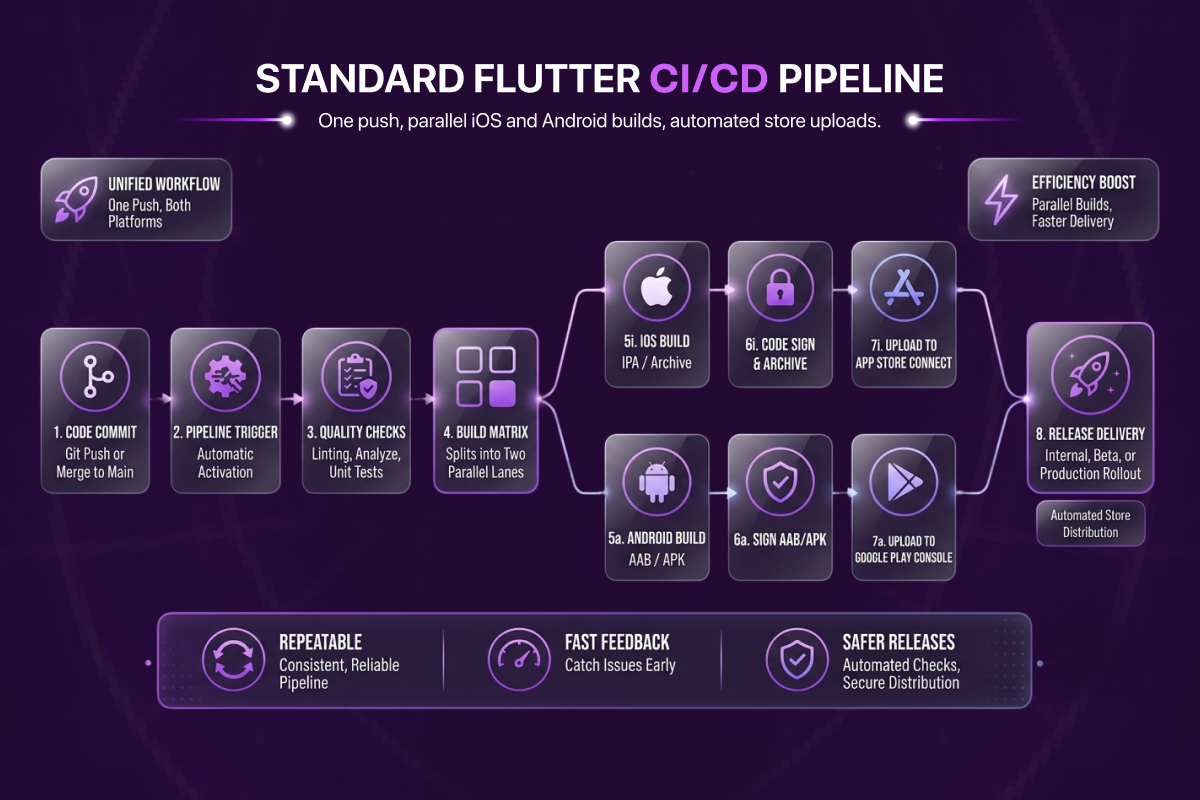
Diagram: the standard Flutter CI/CD pipeline. One push, parallel iOS and Android builds, automated store uploads.
What CI/CD Means in a Flutter Context
Continuous Integration means every code change is automatically tested before it is merged. No pull request reaches the main branch without a passing test suite. Broken code is caught at the pull request stage, not in production.
Continuous Deployment means every merge to the main branch automatically produces a release candidate, built, signed, and distributed to testers or submitted to the App Store and Google Play without manual steps.
In a Flutter project, this breaks down into four concrete automation goals:
- Test automation, run
flutter teston every pull request and block merges on failure - Build automation, produce a signed IPA for iOS and a signed AAB for Android automatically
- Code signing automation, manage certificates, provisioning profiles, and keystores without manual intervention
- Distribution automation, upload builds to TestFlight, Firebase App Distribution, or directly to App Store and Google Play
GitHub Actions handles the first and coordinates the others. Fastlane handles the second, third, and fourth.
Fastlane, What It Automates and How It Works
Fastlane is an open-source automation tool built specifically for mobile app deployment. It has been the industry standard for iOS and Android release automation for nearly a decade and integrates naturally with Flutter's build system.
Fastlane is configured through a Fastfile, a Ruby DSL file that defines lanes, named sequences of actions that perform specific tasks. A beta lane might build the app, sign it, and upload it to TestFlight. A release lane might do the same but submit to App Store production review.
Installing Fastlane
# Install Fastlane via Bundler, the recommended approach
gem install bundler
cd ios && bundle init
echo 'gem "fastlane"' >> Gemfile
bundle install

# Initialise Fastlane in the iOS directory
bundle exec fastlane init
Repeat the initialisation in the android/ directory for Android.
The Fastfile Structure (iOS)
# ios/fastlane/Fastfile
default_platform(:ios)

platform :ios do
  desc "Run all tests"
  lane :test do
    run_tests(
      workspace: "Runner.xcworkspace",
      scheme: "Runner",
      devices: ["iPhone 15"]
    )
  end

  desc "Build and upload to TestFlight"
  lane :beta do
    sync_code_signing(type: "appstore")
    build_ios_app(
      workspace: "Runner.xcworkspace",
      scheme: "Runner",
      export_method: "app-store"
    )
    upload_to_testflight(
      skip_waiting_for_build_processing: true
    )
  end

  desc "Submit to App Store production"
  lane :release do
    sync_code_signing(type: "appstore")
    build_ios_app(
      workspace: "Runner.xcworkspace",
      scheme: "Runner",
      export_method: "app-store"
    )
    upload_to_app_store(
      submit_for_review: true,
      automatic_release: false,
      force: true
    )
  end
end
The Fastfile Structure (Android)
# android/fastlane/Fastfile
default_platform(:android)

platform :android do
  desc "Build and upload to Google Play internal track"
  lane :beta do
    gradle(
      task: "bundle",
      build_type: "Release",
      project_dir: "../android"
    )
    upload_to_play_store(
      track: "internal",
      aab: "../build/app/outputs/bundle/release/app-release.aab"
    )
  end

  desc "Promote internal to production"
  lane :release do
    upload_to_play_store(
      track: "internal",
      track_promote_to: "production",
      rollout: "0.1"  # 10% phased rollout
    )
  end
end
Fastlane Match, Code Signing Without the Pain
Code signing is the single most common source of failure in mobile CI/CD pipelines. Certificates expire. Provisioning profiles become invalid when a new device is added. The developer who set up signing three years ago has left the company. Fastlane Match solves all of these problems.
How Match Works
Match stores all code signing certificates and provisioning profiles in a private Git repository, encrypted with a shared passphrase. Every developer on the team and every CI environment pulls credentials from the same source. There is one set of credentials, one source of truth, and one command to sync them.
# Initialise Match, run once to set up the private certificates repo
bundle exec fastlane match init

# Generate and store development certificates
bundle exec fastlane match development

# Generate and store App Store distribution certificates
bundle exec fastlane match appstore
Match generates the certificates in your Apple Developer account, encrypts them, and pushes them to the private Git repository. From that point, any machine with access to the repository and the passphrase can pull valid, ready-to-use certificates with a single command, sync_code_signing in the Fastfile.
Match in CI
# In the Fastfile, CI-aware Match configuration
lane :beta do
  sync_code_signing(
    type: "appstore",
    readonly: is_ci,  # Never modify certs in CI, read only
    git_url: ENV["MATCH_GIT_URL"],
    password: ENV["MATCH_PASSWORD"]
  )
  # ... build and upload
end
No certificates on any developer's machine are required for CI to produce a signed build. The pipeline is fully self-contained.
Android Code Signing, Keystore Management
Android signing uses a keystore file, a binary containing the signing key that Google Play uses to verify every release. The keystore must be kept secure, backed up reliably, and never committed to version control.
Generating the Keystore
keytool -genkey -v
  -keystore release-keystore.jks
  -keyalg RSA
  -keysize 2048
  -validity 10000
  -alias release
Store the generated keystore file in a secure password manager or secrets vault. Never commit it to the repository.
Keystore in CI
In GitHub Actions, the keystore is stored as a Base64-encoded secret. The pipeline decodes it at build time:
- name: Decode keystore
  run: |
    echo "${{ secrets.ANDROID_KEYSTORE_BASE64 }}" | base64 --decode
> android/app/release-keystore.jks// android/app/build.gradle
def keystoreProperties = new Properties()
def keystorePropertiesFile = rootProject.file('key.properties')
if (keystorePropertiesFile.exists()) {
keystoreProperties.load(new FileInputStream(keystorePropertiesFile))
}
android {
signingConfigs {
release {
keyAlias keystoreProperties['keyAlias']
keyPassword keystoreProperties['keyPassword']
storeFile keystoreProperties['storeFile'] ?
file(keystoreProperties['storeFile']) : null
storePassword keystoreProperties['storePassword']
}
}
buildTypes {
release {
signingConfig signingConfigs.release
}
}
}Flutter Build Flavors, Dev, Staging, and Production
Build flavors allow a single Flutter codebase to produce distinctly configured builds for different environments. The development build points to a local or dev API. The staging build points to staging infrastructure with test data. The production build points to production.
Defining Flavors With --dart-define
// lib/core/config/app_config.dart
class AppConfig {
  static const String apiBaseUrl = String.fromEnvironment(
    'API_BASE_URL',
    defaultValue: 'https://dev-api.example.com',
  );

  static const String environment = String.fromEnvironment(
    'ENVIRONMENT',
    defaultValue: 'development',
  );

  static const bool enableCrashlytics = bool.fromEnvironment(
    'ENABLE_CRASHLYTICS',
    defaultValue: false,
  );
}# Development build
flutter build apk
--dart-define=API_BASE_URL=https://dev-api.example.com
--dart-define=ENVIRONMENT=development
--dart-define=ENABLE_CRASHLYTICS=false
# Staging build
flutter build apk
--dart-define=API_BASE_URL=https://staging-api.example.com
--dart-define=ENVIRONMENT=staging
--dart-define=ENABLE_CRASHLYTICS=true
# Production build
flutter build appbundle
--dart-define=API_BASE_URL=https://api.example.com
--dart-define=ENVIRONMENT=production
--dart-define=ENABLE_CRASHLYTICS=trueSeparate Firebase Projects Per Environment
Each flavor should connect to a separate Firebase project, dev Firestore, staging Firestore, and production Firestore are completely isolated databases with no data crossover. The FlutterFire CLI supports multiple Firebase configurations:
# Configure dev environment
flutterfire configure
  --project=my-app-dev
  --out=lib/firebase_options_dev.dart

# Configure staging environment
flutterfire configure
  --project=my-app-staging
  --out=lib/firebase_options_staging.dart

# Configure production environment
flutterfire configure
  --project=my-app-prod
  --out=lib/firebase_options_prod.dart
The Complete GitHub Actions Pipeline
With Fastlane and Match configured, the GitHub Actions workflow ties everything together. The pipeline runs on every push and pull request, tests on PRs, full build and deployment on merges to main.
# .github/workflows/ci_cd.yml
name: Flutter CI/CD

on:
  push:
    branches: [main, develop]
  pull_request:
    branches: [main]

env:
  FLUTTER_VERSION: '3.x'

jobs:
  test:
    name: Run Tests
    runs-on: ubuntu-latest
    steps:
      - uses: actions/checkout@v4
      - uses: subosito/flutter-action@v2
        with:
          flutter-version: ${{ env.FLUTTER_VERSION }}
          cache: true

      - name: Install dependencies
        run: flutter pub get

      - name: Verify formatting
        run: dart format --output=none --set-exit-if-changed .

      - name: Run static analysis
        run: flutter analyze

      - name: Run unit and widget tests
        run: flutter test --coverage

  deploy_ios:
    name: Deploy iOS to TestFlight
    runs-on: macos-latest
    needs: test
    if: github.ref == 'refs/heads/main' && github.event_name == 'push'
    steps:
      - uses: actions/checkout@v4
      - uses: subosito/flutter-action@v2
        with:
          flutter-version: ${{ env.FLUTTER_VERSION }}
          cache: true

      - run: flutter pub get

      - uses: ruby/setup-ruby@v1
        with:
          ruby-version: '3.2'
          bundler-cache: true
          working-directory: ios

      - name: Build Flutter iOS
        run: |
          flutter build ios --release --no-codesign
            --dart-define=API_BASE_URL=${{ secrets.STAGING_API_URL }}
            --dart-define=ENVIRONMENT=staging

      - name: Deploy to TestFlight via Fastlane
        env:
          MATCH_GIT_URL: ${{ secrets.MATCH_GIT_URL }}
          MATCH_PASSWORD: ${{ secrets.MATCH_PASSWORD }}
        run: cd ios && bundle exec fastlane beta

  deploy_android:
    name: Deploy Android to Play Store
    runs-on: ubuntu-latest
    needs: test
    if: github.ref == 'refs/heads/main' && github.event_name == 'push'
    steps:
      - uses: actions/checkout@v4
      - uses: subosito/flutter-action@v2
        with:
          flutter-version: ${{ env.FLUTTER_VERSION }}
          cache: true

      - run: flutter pub get

      - name: Decode Android keystore
        run: |
          echo "${{ secrets.ANDROID_KEYSTORE_BASE64 }}" |
            base64 --decode > android/app/release-keystore.jks

      - uses: ruby/setup-ruby@v1
        with:
          ruby-version: '3.2'
          bundler-cache: true
          working-directory: android

      - name: Build Flutter Android
        run: |
          flutter build appbundle --release
            --dart-define=API_BASE_URL=${{ secrets.STAGING_API_URL }}
            --dart-define=ENVIRONMENT=staging

      - name: Deploy to Play Store via Fastlane
        env:
          PLAY_STORE_JSON_KEY: ${{ secrets.PLAY_STORE_JSON_KEY }}
        run: cd android && bundle exec fastlane beta
What This Pipeline Does
On every pull request to main:
- Runs
flutter analyze, static analysis and linting - Runs
flutter test --coverage, full unit and widget test suite - Blocks merge if any step fails
On every merge to main:
- Runs all of the above first, the deploy jobs have
needs: test - Builds the iOS IPA using Flutter, signs it with Fastlane Match, uploads to TestFlight
- Builds the Android AAB, signs it with the keystore, uploads to the Play Store internal track
- Both deploy jobs run in parallel, total pipeline time is typically 15-20 minutes
Version Bumping, Automating Build Numbers
Every App Store and Google Play submission requires a unique build number. Manually bumping pubspec.yaml before every release is error-prone. Automate it using the CI run number:
- name: Set build number
  run: |
    sed -i "s/^version: .*/version: $(cat VERSION)+${{ github.run_number }}/"
      pubspec.yaml
Every pipeline run produces a unique, incrementing build number automatically. No developer needs to remember to bump it.
Phased Rollouts, Zero-Downtime Releases
Submitting directly to 100% of users on the first release of a new version is an unnecessary risk. Both App Store and Google Play support phased rollouts, releasing to a percentage of users progressively.
Google Play phased rollouts are configured in Fastlane:
lane :release do
  upload_to_play_store(
    track: "production",
    rollout: "0.1"  # Start at 10%
  )
end

# After monitoring, promote to 50%
lane :expand_rollout do
  upload_to_play_store(
    track: "production",
    rollout: "0.5"
  )
end
App Store phased releases are a 7-day rolling rollout to 1%, 2%, 5%, 10%, 20%, 50%, and 100% of users:
upload_to_app_store(
  phased_release: true,
  submit_for_review: true
)
Monitor Crashlytics for crash rate increases and Firebase for error spikes during the initial rollout window. If a critical issue is detected, the rollout can be halted in the Play Console before it reaches the full user base.
GitHub Actions Secrets, What to Store and How
The pipeline above references multiple secrets. Configure them in your GitHub repository's Settings ? Secrets and variables ? Actions:
| Secret name | What it contains |
|---|---|
MATCH_GIT_URL | SSH URL of the private Match certificates repository |
MATCH_PASSWORD | Passphrase used to encrypt the Match repository |
ASC_KEY_ID | App Store Connect API key ID |
ASC_ISSUER_ID | App Store Connect API issuer ID |
ASC_API_KEY | App Store Connect API private key content (.p8 file) |
ANDROID_KEYSTORE_BASE64 | Base64-encoded Android release keystore |
KEYSTORE_PASSWORD | Password for the Android keystore |
KEY_PASSWORD | Password for the release key alias |
PLAY_STORE_JSON_KEY | Google Play service account JSON key |
STAGING_API_URL | API base URL for the staging environment |
PROD_API_URL | API base URL for the production environment |
None of these values appear anywhere in the repository. They are injected into the pipeline at runtime by GitHub Actions and are never exposed in logs.
Red Flags in Flutter CI/CD Setups
Manual code signing. If any developer has to open Xcode or Android Studio to sign a build before release, the signing is not automated. Fastlane Match should handle all signing.
Secrets in the repository. Keystores, .p8 files, or JSON keys committed to version control, even in private repositories, are a security incident waiting to happen.
No test gate before deployment. A pipeline that builds and deploys without first running the test suite will eventually deploy a broken build. The needs: test dependency in the deploy jobs is not optional.
Single environment, no staging. Deploying directly from the development environment to production with no staging step means every production release is also the first real test of that build on live infrastructure.
Manual version bumps. If a developer has to remember to increment the build number before releasing, they will eventually forget, and the submission will be rejected. Automate it with the CI run number.
Next Steps
A working CI/CD pipeline is the point at which a Flutter project becomes a professional software delivery operation. Tests run automatically. Builds are signed automatically. Releases reach testers automatically. The manual steps that introduced risk and depended on specific individuals are gone.
The pipeline described in this article, GitHub Actions running tests on every pull request, Fastlane deploying signed builds to TestFlight and the Play Store internal track on every merge to main, is the baseline that every production Flutter application should have before its first public release. Not after. Before.
Continue with our Flutter testing guide to understand the test suite that runs in this pipeline, our Flutter Firebase guide for how separate Firebase projects per environment are structured, or our Flutter Clean Architecture guide for the architectural foundation that makes the codebase testable and deployable with confidence.
Frequently Asked Questions About Flutter CI/CD
Do I need CI/CD for a small Flutter app?
Yes. Even a single-developer Flutter project benefits from automated test runs on every commit, automated builds, and automated deployment to TestFlight. The setup cost (1-2 days) pays back the first time you forget to bump a version number, mis-sign a build, or accidentally ship without running tests. Manual deployment is only acceptable for throwaway prototypes.
What's the difference between GitHub Actions and Fastlane?
GitHub Actions is the pipeline orchestrator, it runs on every push, decides what jobs to execute, handles secrets, and reports results. Fastlane is the mobile-specific automation tool, it knows how to build iOS/Android binaries, manage code signing, and upload to TestFlight/Play Store. GitHub Actions calls Fastlane. You need both.
Is Fastlane Match really necessary or can I just commit certificates to the repo?
Match is necessary. Certificates committed to a repository, even a private one, are a security incident waiting to happen and break the moment a developer's laptop dies. Match stores certificates in a private encrypted Git repo with a shared passphrase, every machine pulls the same credentials with one command. It is the only sane way to manage iOS signing in a team.
Can I run Flutter CI/CD on GitLab or Bitbucket instead of GitHub Actions?
Yes. The principles are identical: a pipeline trigger, a test job, build jobs per platform, Fastlane for signing and distribution. GitLab CI/CD and Bitbucket Pipelines have equivalent YAML configurations. The article uses GitHub Actions because it is the most common choice, but Fastlane works identically regardless of the orchestrator.
How long does a Flutter CI/CD pipeline take to run?
Test job (PR pipeline): 3-7 minutes. Full deploy pipeline (merge to main, builds and uploads both platforms in parallel): 15-20 minutes. iOS build alone takes 8-12 minutes on macOS runners; Android build takes 4-7 minutes on Ubuntu runners. Caching Flutter SDK and dependencies between runs is critical for these times, the cache: true option in flutter-action handles it.
Should I deploy directly to production or use a staging track?
Always use a staging step. On Google Play, that means the internal or alpha track. On the App Store, that means TestFlight with an internal testing group. Every production release should be the second time that exact build runs on real devices, not the first. The cost of a broken production release is significantly higher than the small extra step of staging.
Does ETechViral set up CI/CD as part of every Flutter engagement?
Yes. A working CI/CD pipeline (GitHub Actions + Fastlane + Match + environment-separated Firebase) is a standard deliverable of every Flutter project we deliver. The pipeline is configured before the first feature is merged, not after the first release. Our Flutter team sets up the full pipeline as part of project kickoff.
Troubleshooting
Why does my iOS build fail with a code signing error in CI?
The usual cause is that Fastlane Match cannot reach the certificates repository or the MATCH_PASSWORD secret is missing. Confirm the CI job has MATCH_GIT_URL and MATCH_PASSWORD set, that the CI deploy key has read access to the certificates repo, and that you call match in readonly mode on CI so it never tries to create new certificates.
Why does GitHub Actions say my secret is empty or not found?
Secrets are case-sensitive and are not exposed to pull requests opened from forks. Check that the secret exists under Settings, Secrets and variables, Actions, that the workflow references it as the exact ${{ secrets.NAME }}, and that the job is not a fork pull request, which cannot read secrets by design.
Why does the Android build fail with keystore not found?
This happens when the base64-encoded keystore secret is not decoded to a file before Gradle runs, or the key.properties path is wrong. Make sure the Decode keystore step writes the file to the exact path referenced in build.gradle, and that storeFile, storePassword, keyAlias, and keyPassword all resolve from the decoded key.properties.