Flutter Clean Architecture: A Complete Guide With Examples
Flutter Clean Architecture explained: Presentation, Domain, Data layers with full Dart code, dependency injection (get_it), and feature-first folders.
Every Flutter project starts clean. The first few sprints move fast, widgets go up, API calls get made, features ship. Then, around sprint four or five, something quietly breaks. Adding a new feature requires touching five files that should have nothing to do with each other. A UI change accidentally breaks business logic. Unit tests become impossible to write because the network call is embedded inside the widget. The codebase is not buggy, it is unstructured. And unstructured codebases do not get better on their own.
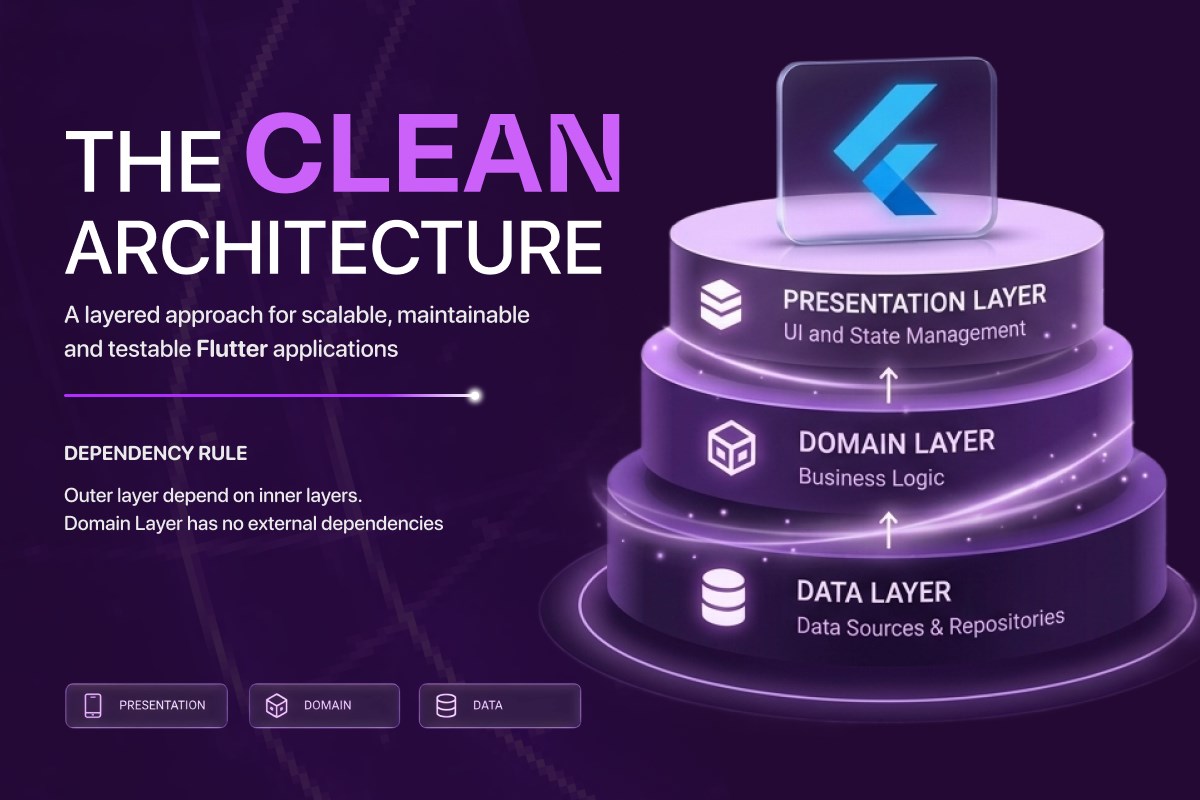
- Clean Architecture organises Flutter code into three layers, Presentation, Domain, and Data, with strict rules about which direction dependencies are allowed to point.
- The Domain layer holds entities, repository interfaces, and use cases, with zero Flutter or external imports, only pure Dart.
- Outer layers depend on inner layers, never the reverse. This single rule is what makes every layer independently testable and replaceable.
- Feature-first folder structure (auth/, orders/, profile/) scales better than layer-first for any Flutter project beyond a few screens.
- Dependency injection with
get_itandinjectablewires the layers together at app boot; the Either type handles errors without exceptions.
- Why Architecture Matters Before You Write Feature Code
- What Is Clean Architecture
- The Three Layers of Clean Architecture in Flutter
- How the Layers Work Together, The Full Flow
- Folder Structure, Feature-First vs Layer-First
- Dependency Injection, Wiring the Layers Together
- Error Handling in Clean Architecture
- How Architecture Connects to Testing
- Common Mistakes to Avoid
- Next Steps
- Frequently Asked Questions
Architecture is the decision that prevents this. Made deliberately before the first feature is built, it is the difference between a Flutter project that scales and one that becomes a liability.
This article is part of our Complete Guide to Flutter App Development, the parent guide covering every major Flutter decision from framework selection through CI/CD deployment. Reference points include Robert C. Martin's original Clean Architecture article and the get_it package documentation. If you are still deciding whether to use Flutter at all, start with our Flutter vs React Native comparison. If you have chosen Flutter and want to understand how architecture connects to state management, our Bloc vs Riverpod guide covers that decision in depth. Those same boundaries are what keep protected health information auditable, which our Flutter healthcare app development guide covers in detail.
Ready to build? Our Flutter development team is available for a free consultation.
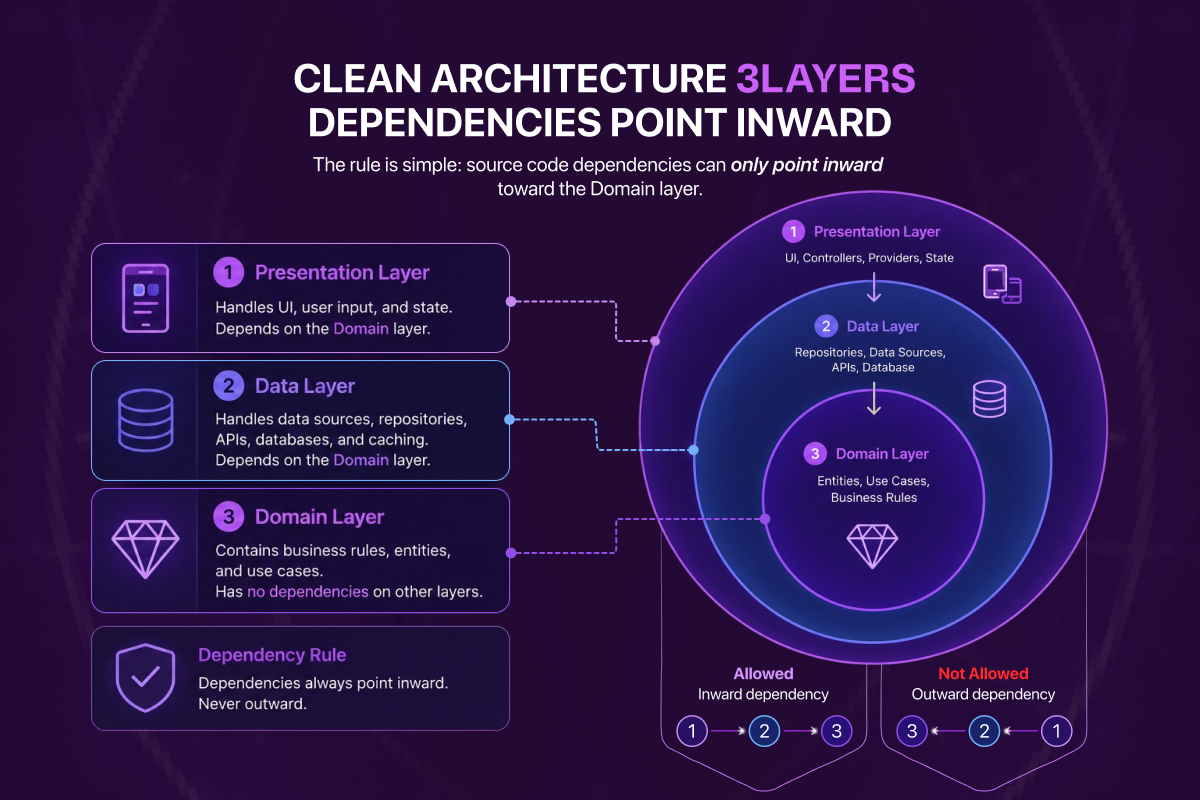
Diagram: the three layers of Clean Architecture. Dependencies always point inward toward Domain, never the other way.
Why Architecture Matters Before You Write a Line of Feature Code
Architecture is not an academic exercise. It is a set of structural rules that determine where code lives, how different parts of the codebase communicate, and what dependencies are allowed to point where. Without those rules, every developer on a team makes their own decisions, and six months later, the codebase reflects six different opinions about where business logic should live.
The cost of skipping architecture is not visible immediately. It accumulates. Every feature that embeds a network call inside a widget creates a test that cannot be written. Every piece of business logic that lives in a screen file creates a dependency that has to be untangled when that screen is redesigned. Every time a developer has to read three hundred lines of a HomePage widget to find out where the loading state is set, the codebase is costing the team time.
Clean Architecture, introduced by Robert C. Martin and widely adopted in Flutter production codebases, solves this structurally. It does not rely on discipline or convention. It enforces separation through import rules that make violations impossible, or at minimum, immediately obvious.
What Is Clean Architecture
Clean Architecture organises a codebase into concentric layers, each with a clearly defined responsibility and a strict rule about which direction dependencies can point. In a Flutter implementation, those layers are three: Presentation, Domain, and Data.
The dependency rule is the most important concept to internalise: outer layers depend on inner layers, never the reverse. The presentation layer depends on the domain layer. The data layer depends on the domain layer. The domain layer depends on nothing.
This single rule is what makes Clean Architecture effective. The domain layer, the core of your application, the layer that contains your business logic, has zero external dependencies. It knows nothing about Flutter, nothing about HTTP, nothing about SQLite, nothing about Firebase. It is pure Dart. This means it can be tested in complete isolation from every external concern.
The Three Layers of Clean Architecture in Flutter
1. The Domain Layer, The Core of Your Application
The domain layer is the innermost layer. It contains:
- Entities, pure Dart classes representing the core data models of your business. A
User, anOrder, aProduct. No JSON serialisation. No database annotations. No Flutter imports. Just data and any domain-level validation logic that belongs to it. - Repository interfaces, abstract Dart classes that define what data operations are available to the domain layer. A
UserRepositoryinterface might definegetUser(String id),updateUser(User user), anddeleteUser(String id). The interface lives in the domain layer. The implementation does not. - Use cases, single-responsibility Dart classes that each represent one business operation.
GetUserUseCase,PlaceOrderUseCase,SendPasswordResetUseCase. Each use case takes whatever input it needs, calls the repository interface it depends on, and returns a result. No UI logic. No network code. Just the business rule.
The domain layer has one import rule: it imports nothing outside of pure Dart. No package:flutter, no package:dio, no package:hive. If you see a Flutter import in a domain layer file, something has gone wrong.
Example, a domain layer use case:
// domain/usecases/get_user_usecase.dart
import '../entities/user.dart';
import '../repositories/user_repository.dart';

class GetUserUseCase {
  final UserRepository repository;

  GetUserUseCase({required this.repository});

  Future<User> call(String userId) async {
    return await repository.getUser(userId);
  }
}
No Flutter. No HTTP. No database. The use case calls a repository interface. At test time, you inject a mock repository. In production, you inject the real one. The use case never knows the difference.
2. The Data Layer, Where the Outside World Lives
The data layer is the outermost layer on the data side. It contains:
- Repository implementations, the concrete classes that implement the repository interfaces defined in the domain layer.
UserRepositoryImplimplementsUserRepository. It knows about API clients, database connections, and caching strategies. The domain layer does not. - Data sources, classes responsible for a single data source. A
UserRemoteDataSourcemakes HTTP calls. AUserLocalDataSourcereads and writes to a local database. The repository implementation coordinates between them, deciding when to fetch from the network, when to serve from cache, and how to handle conflicts. - Data models, classes that handle serialisation and deserialisation. A
UserModelknows how to parse itself from JSON. It typically extends or maps to theUserentity from the domain layer, keeping serialisation concerns separate from business logic.
Example, a data layer repository implementation:
// data/repositories/user_repository_impl.dart
import '../../domain/entities/user.dart';
import '../../domain/repositories/user_repository.dart';
import '../datasources/user_remote_datasource.dart';
import '../datasources/user_local_datasource.dart';

class UserRepositoryImpl implements UserRepository {
  final UserRemoteDataSource remoteDataSource;
  final UserLocalDataSource localDataSource;

  UserRepositoryImpl({
    required this.remoteDataSource,
    required this.localDataSource,
  });

  @override
  Future<User> getUser(String userId) async {
    try {
      final userModel = await remoteDataSource.getUser(userId);
      await localDataSource.cacheUser(userModel);
      return userModel.toEntity();
    } catch (_) {
      final cached = await localDataSource.getCachedUser(userId);
      return cached.toEntity();
    }
  }
}
The repository implementation knows about remote and local data sources. The use case that calls getUser() knows none of this. It calls the interface. The implementation handles the detail.
3. The Presentation Layer, Widgets and ViewModels
The presentation layer is where Flutter lives. It contains:
- Widgets and screens, Flutter UI components that display state and dispatch events or actions. A
ProfileScreendisplays a user's details. It does not fetch that user itself. - ViewModels, Cubits, or Blocs, classes that hold UI state and coordinate between the presentation layer and the domain layer. A
ProfileCubitcallsGetUserUseCase, receives the result, and emits a new state that the screen observes and rebuilds from.
The presentation layer depends on the domain layer, it calls use cases. It never imports the data layer directly.
Example, a presentation layer Cubit:
// presentation/cubits/profile_cubit.dart
import 'package:flutter_bloc/flutter_bloc.dart';
import '../../domain/usecases/get_user_usecase.dart';
import 'profile_state.dart';

class ProfileCubit extends Cubit<ProfileState> {
  final GetUserUseCase getUserUseCase;

  ProfileCubit({required this.getUserUseCase}) : super(ProfileInitial());

  Future<void> loadUser(String userId) async {
    emit(ProfileLoading());
    try {
      final user = await getUserUseCase(userId);
      emit(ProfileLoaded(user: user));
    } catch (e) {
      emit(ProfileError(message: e.toString()));
    }
  }
}
The Cubit calls a use case. The use case calls a repository interface. The repository implementation talks to the network. Each layer only knows about its immediate dependency, and each can be tested in isolation.
How the Layers Work Together, The Full Flow
When a user opens a profile screen, this is what happens in a Clean Architecture Flutter application:
- The
ProfileScreenwidget is built. It triggersProfileCubit.loadUser(userId). - The Cubit emits
ProfileLoading(). The screen rebuilds to show a loading indicator. - The Cubit calls
GetUserUseCase(userId). - The use case calls
UserRepository.getUser(userId), the interface, not the implementation. - At runtime, dependency injection has wired
UserRepositoryImplas the concrete implementation. UserRepositoryImpltries the remote data source. If it succeeds, it caches the result and returns the entity. If it fails, it returns the cached version.- The entity travels back up through the use case to the Cubit.
- The Cubit emits
ProfileLoaded(user: user). The screen rebuilds to show the profile.
At no point does the screen know where the data came from. At no point does the use case know how the data was fetched. At no point does the repository implementation know how the data will be displayed. Each layer is replaceable independently.
Folder Structure, Feature-First vs Layer-First
There are two common approaches to organising the physical folder structure of a Clean Architecture Flutter project.
Layer-First Structure
lib/
??? data/
?   ??? datasources/
?   ??? models/
?   ??? repositories/
??? domain/
?   ??? entities/
?   ??? repositories/
?   ??? usecases/
??? presentation/
    ??? cubits/
    ??? screens/
    ??? widgets/
Layer-first structure is simple to understand and easy to navigate for small applications. It breaks down when the application grows, all data sources for all features live in the same folder, making it difficult to understand which files belong to which feature.
Feature-First Structure
lib/
??? features/
?   ??? auth/
?   ?   ??? data/
?   ?   ??? domain/
?   ?   ??? presentation/
?   ??? profile/
?   ?   ??? data/
?   ?   ??? domain/
?   ?   ??? presentation/
?   ??? orders/
?       ??? data/
?       ??? domain/
?       ??? presentation/
??? core/
    ??? network/
    ??? error/
    ??? injection/
Feature-first structure scales. Each feature is self-contained, its data, domain, and presentation layers live together. The core folder contains shared infrastructure: the HTTP client, error handling, dependency injection setup, shared utility classes. A developer working on the orders feature touches only the orders/ folder. A developer working on authentication touches only the auth/ folder. There are no accidental cross-feature dependencies unless they are explicit and deliberate.
For any Flutter project beyond a simple prototype, feature-first is the recommended structure.
Dependency Injection, Wiring the Layers Together
Clean Architecture separates interface from implementation. Dependency injection is the mechanism that wires the concrete implementation to the interface at runtime without the layers knowing about each other.
The most common dependency injection approach in Flutter production codebases is get_it, a simple service locator. injectable works alongside get_it to generate the registration code automatically using annotations, reducing boilerplate significantly.
Example, dependency injection setup:
// core/injection/injection.dart
import 'package:get_it/get_it.dart';
import 'package:injectable/injectable.dart';
import 'injection.config.dart';

final getIt = GetIt.instance;

@InjectableInit()
void configureDependencies() => getIt.init();

// data/repositories/user_repository_impl.dart
@Injectable(as: UserRepository)
class UserRepositoryImpl implements UserRepository {
  // ...
}
The @Injectable(as: UserRepository) annotation tells injectable to register UserRepositoryImpl as the concrete implementation whenever UserRepository is requested. The generated code handles the wiring. The domain layer never sees it.
Error Handling in Clean Architecture
A production Flutter application needs a consistent approach to error handling across all three layers. The most common pattern is using a Result type, either the dartz package's Either<Failure, Success> or a custom sealed class, to represent operations that can succeed or fail without throwing exceptions.
// domain/usecases/get_user_usecase.dart
Future<Either<Failure, User>> call(String userId) async {
  return await repository.getUser(userId);
}
The Cubit or ViewModel receives an Either and handles both cases:
final result = await getUserUseCase(userId);
result.fold(
  (failure) => emit(ProfileError(message: failure.message)),
  (user) => emit(ProfileLoaded(user: user)),
);
This pattern eliminates unhandled exceptions in the presentation layer. Every failure is explicit. Every success is explicit. The UI always knows which state to display.
How Architecture Connects to Testing
Clean Architecture makes every layer independently testable, not as a design aspiration but as a structural guarantee.
Domain layer tests require no mocks for external systems. You mock the repository interface and test the use case logic directly:
test('GetUserUseCase returns user when repository succeeds', () async {
  when(mockUserRepository.getUser('user-123'))
      .thenAnswer((_) async => tUser);

  final result = await getUserUseCase('user-123');

  expect(result, Right(tUser));
});
Data layer tests test the repository implementation with mocked data sources. You verify that the implementation calls the remote source first, caches the result, and falls back to local on failure.
Presentation layer tests test the Cubit with a mocked use case. You verify that the Cubit emits the expected sequence of states in response to use case results.
No layer requires a running server, a real database, or a connected device to be fully tested. This is what makes 80%+ unit test coverage achievable on a Clean Architecture Flutter codebase, the architecture removes the barriers to testing that unstructured codebases create.
For a deeper look at how these tests are written in practice, our Flutter testing guide covers unit, widget, and integration testing in full.
Common Mistakes to Avoid
Putting business logic in widgets. The most common mistake in Flutter codebases without architecture. If a widget is making decisions about what to show based on raw API response data, that decision belongs in a use case or ViewModel, not in the widget's build method.
Importing the data layer from the presentation layer. The presentation layer should never import a repository implementation directly. It should call a use case. The use case calls the repository interface. The implementation is wired by dependency injection. If you find yourself importing UserRepositoryImpl from a Cubit, the dependency rule has been violated.
Putting Flutter imports in the domain layer. The domain layer should contain pure Dart. If a use case or entity imports package:flutter, it cannot be tested without a Flutter test environment, and it is tightly coupled to the rendering framework in a way that makes future changes more difficult.
Using a single usecase.dart file for all use cases. Every use case is a separate class in a separate file. The single responsibility principle applies at the file level as much as the class level. PlaceOrderUseCase, CancelOrderUseCase, and GetOrderHistoryUseCase are three files, not three methods in one file.
Next Steps
Clean Architecture is the structural foundation that every other Flutter decision builds on. State management patterns like Bloc and Riverpod slot into the presentation layer. Firebase and custom backends plug into the data layer. CI/CD pipelines test each layer independently. The architecture is what makes all of it work together reliably.
Frequently Asked Questions About Flutter Clean Architecture
What is Clean Architecture in Flutter?
Clean Architecture is a way of structuring a Flutter codebase into three concentric layers, Presentation, Domain, and Data, with a strict dependency rule: outer layers depend on inner layers, never the reverse. The domain layer holds your business logic in pure Dart with zero external dependencies, making it independently testable and replaceable.
Why does my Flutter app need Clean Architecture instead of just calling APIs from widgets?
Calling APIs directly from widgets makes business logic impossible to test without rendering the widget, and any UI change risks breaking unrelated business rules. Clean Architecture separates these concerns structurally so widgets only handle display, ViewModels coordinate state, and use cases hold business rules, all independently testable.
Is Clean Architecture overkill for small Flutter projects?
For a throwaway prototype with one screen and a hardcoded data source, yes. For anything that will be maintained beyond the first month or have a second developer touch it, no. The structural overhead of Clean Architecture pays back the moment the second feature is added or the first bug requires refactoring shared code.
What is the difference between feature-first and layer-first folder structures?
Layer-first puts all entities in one folder, all use cases in another, all widgets in a third. Feature-first creates a folder per feature (auth, profile, orders) and each contains its own data/domain/presentation subfolders. Layer-first is simpler at very small scale; feature-first scales to large teams because each feature is self-contained.
Which dependency injection library should I use in Flutter?
get_it combined with injectable is the most common combination in production Flutter codebases. get_it is the service locator that resolves dependencies at runtime; injectable uses annotations and code generation to register implementations without manual boilerplate. Riverpod users get DI built into the framework and do not need a separate library.
Can I use Clean Architecture with both Bloc and Riverpod?
Yes. Both Bloc and Riverpod sit in the presentation layer of a Clean Architecture application. The domain layer (use cases, entities) and data layer (repositories, data sources) are identical regardless of state management choice. See our Bloc vs Riverpod comparison for how each integrates into the presentation layer.
How does Clean Architecture affect Flutter testing?
It makes testing easier by removing external dependencies from the units being tested. Domain layer tests need only a mocked repository interface. Data layer tests need only mocked data sources. Presentation layer tests need only a mocked use case. No real network, no real database, no device required. Our Flutter testing guide covers exactly how to test each layer.