The Flutter Development Process, Step by Step
How we build Flutter apps: a phase-by-phase process from discovery and design through architecture, testing, CI/CD, and post-launch support.
Our Flutter development process moves every project through seven phases: discovery, design, architecture, development, QA, release, and post-launch support. Each phase has a clear purpose, a deliverable you receive, and a point where you review the work before it continues. The goal is simple. You always know what is being built, why, and what it will look like when it is done, and there is no long silent stretch where a team disappears and hopes the result matches what you had in mind.
- The process has seven phases, and each one ends with something concrete you can review, not just a progress update.
- Discovery comes before any code and produces a defined scope, a feature list, and an estimate, so the project starts with agreement rather than assumptions.
- Development runs in short sprints, and every sprint ends with a working build you can open and use.
- Testing and CI/CD are built in from the start, not added at the end, which is what makes releases and later updates safe.
- Launch is a phase, not the finish line. Post-launch support keeps the app healthy as devices, operating systems, and your product evolve.
- How We Build Flutter Apps: The Seven Phases
- Phase 1: Discovery and Scoping
- Phase 2: UX and UI Design
- Phase 3: Architecture and Project Setup
- Phase 4: Development in Sprints
- Phase 5: QA and Testing
- Phase 6: CI/CD and Release
- Phase 7: Launch and Post-Launch Support
- How We Keep You Involved
- Quality and Engineering Standards
- Next Steps
- Frequently Asked Questions
This guide walks through how we take a Flutter app from an idea to a product in the app stores and keep it healthy afterwards. It is part of our Complete Guide to Flutter App Development, which covers the technical decisions behind each phase in depth. Here the focus is the process itself: what happens at each stage, what you receive, and how involved you will be.
How We Build Flutter Apps: The Seven Phases
Every project follows the same seven phases, whether it is a first MVP or a rebuild of an existing product. The phases are consistent because each one depends on the one before it. Design needs a defined scope. Architecture needs the design. Development needs the architecture in place. Skipping ahead is where projects accumulate rework, so the sequence is deliberate.
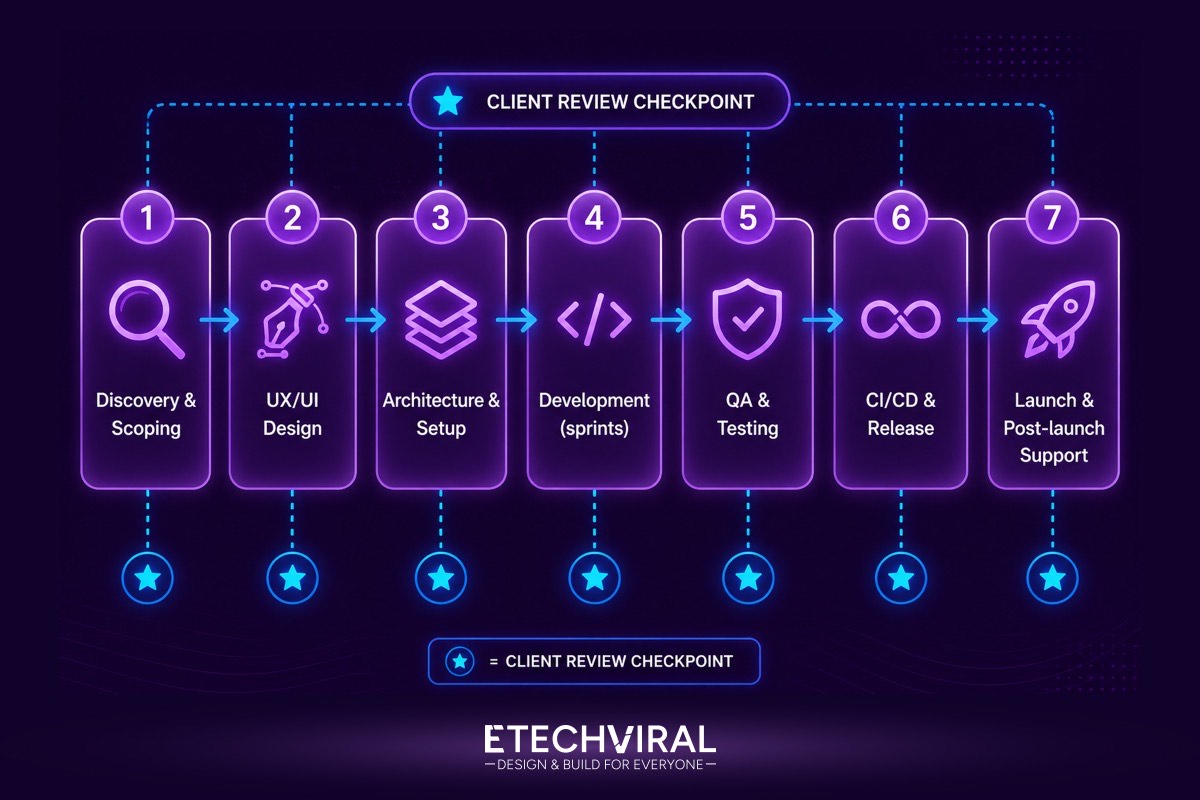
Diagram: the seven phases of our Flutter development process. The star marks a client review checkpoint at the end of each phase.
What changes between projects is not the shape of the process but the weight of each phase. A data-heavy fintech product spends more time on architecture and testing. A design-led consumer app spends more on UX. Discovery is where we work out where the weight belongs for your specific project, so the estimate reflects reality rather than a generic template.
Phase 1: Discovery and Scoping
Discovery turns an idea into a plan. We work through what the app needs to do, who it is for, and which features belong in the first release versus a later one. The output is a defined scope, a prioritised feature list, and an estimate of cost and timeline, produced before any code is written.
This is the phase that protects the budget. Most overruns come from scope that was never pinned down, so decisions made here, about what is in, what is out, and what can wait, are what keep the rest of the project predictable. If you already have requirements or designs, discovery is shorter. If you do not, this phase produces them.
You receive: a scope document, a feature list, and a cost and timeline estimate.
Phase 2: UX and UI Design
With the scope agreed, design defines how the app works and how it looks. UX comes first: the flows, the screens, and how a user moves from opening the app to completing the thing they came to do. Visual design follows, applying your brand to those flows as screens that developers can build from directly.
Flutter matters here in a way it does not in most stacks. Because Flutter draws its own interface rather than relying on each platform's native components, a design is rendered pixel for pixel the same on iOS and Android. What the designer draws is what ships, on every platform, which removes a whole category of per-platform visual fixes later.
You receive: user flows, wireframes, and a visual design for the screens in scope.
Phase 3: Architecture and Project Setup
Before feature work begins, we set up the project structure that everything else is built on. This is the decision that determines whether the codebase stays clean as it grows or turns into something that is slow and risky to change. We structure Flutter projects using Clean Architecture, with clear separation between the interface, the business logic, and the data layer, so features can be added and tested in isolation.
State management is chosen at this stage to match the product, an assessment we cover in our guide to Bloc versus Riverpod. The project repository, environments, and the testing and build tooling are all set up now, so that from the first feature onward the team is working inside a structure designed to scale.
You receive: a configured project with its architecture, state management, and tooling in place.
Phase 4: Development in Sprints
Development runs in short, repeating sprints. Each sprint takes a slice of the feature list, builds it, tests it, and ends with a working build you can install and use. You are not waiting until the end to see the product. You see it grow, sprint by sprint, and you steer it as it does.
This rhythm exists to remove risk. A long build with no checkpoints is where a project drifts away from what the client wanted without anyone noticing until it is expensive to correct. Ending each sprint with a real, usable build means feedback arrives early and often, while changes are still cheap to make.
You receive: a working build at the end of every sprint, plus a review of what was completed and what is next.
Phase 5: QA and Testing
Testing is not a phase that waits at the end. It runs alongside development, and it is built into the architecture from Phase 3 precisely so that it can. We write automated tests at three levels, unit tests for business logic, widget tests for the interface, and integration tests for complete user flows, an approach we detail in our Flutter app testing guide.
Automated tests do two things. They catch regressions the moment a change breaks something that used to work, and they give you evidence that the app behaves correctly, rather than a promise that it does. On a product where a defect has real consequences, that evidence is the difference between shipping with confidence and shipping and hoping.
You receive: a tested build with automated coverage across logic, interface, and user flows.
Phase 6: CI/CD and Release
Getting an app into the App Store and Google Play reliably is its own discipline. We set up a continuous integration and delivery pipeline, using tools such as Fastlane and GitHub Actions, so that builds are produced, tested, and submitted the same way every time. Our Flutter CI/CD guide covers how this is built.
An automated pipeline replaces the error-prone manual steps of signing, building, and uploading with a process that runs identically on every release. That reproducibility is what makes the first launch smooth, and, just as importantly, it is what makes every update afterwards a routine event rather than a risk.
You receive: an automated build and release pipeline, and the app submitted to the stores.
Phase 7: Launch and Post-Launch Support
Launch is the start of the app's life, not the end of the work. Once the app is live, we monitor crashes and performance with real users on real devices, fix issues as they surface, and ship updates through the pipeline built in the previous phase. Operating systems change, devices change, and your product will change too, and a live app needs maintenance to stay healthy through all of it.
Post-launch is also where a product improves. Real usage shows what people actually do, which is rarely exactly what anyone predicted, and that evidence feeds the next round of priorities. The sprint rhythm from development continues here, applied to iterating on a live product rather than building a new one.
You receive: production monitoring, ongoing fixes and updates, and a roadmap for what comes next.
How We Keep You Involved
The process is built so you are never guessing about the state of your project. Each phase ends with a deliverable you can see and assess, and during development each sprint ends with a build you can open and use. Between those checkpoints there is regular communication about what is being worked on and any decisions that need your input.
The principle is that a client should never have to ask whether things are on track, because the answer is always visible in the work itself. You do not need to be technical to follow the process. You need to be able to open a build, use it, and say what is right and what is not, and everything is structured to make that easy.
Quality and Engineering Standards
The same standards apply to every project, regardless of size. Code is reviewed before it is merged, not after it ships. Automated tests run on every change through the CI pipeline. The architecture keeps concerns separated so that a change in one area does not quietly break another. And performance is treated as a requirement measured with real tooling, not an afterthought judged by feel.
These are not optional extras added when a budget allows. They are the difference between a codebase that stays maintainable as it grows and one that becomes slower and riskier to change with every feature. Building them in from the start is what lets a product keep moving quickly long after the first release.
Next Steps
A clear process is what turns an app idea into a product that ships on schedule and keeps working after launch. Seven phases, each ending in something you can see and assess, with testing and release engineering built in from the start rather than bolted on at the end.
If you are planning a Flutter project, our Flutter app development service can take you through discovery and map the scope, architecture, and timeline before any code is written. You can book a free consultation to talk through what you are building.
Frequently Asked Questions About Our Flutter Development Process
How long does it take to build a Flutter app?
It depends on scope. A focused MVP moves through the process faster than a multi-feature product with several integrations, and the honest answer for any specific project comes out of the discovery phase, where the feature set is defined and estimated. What is consistent is the shape of the process: discovery, design, architecture, development in sprints, QA, release, and post-launch support. Building for iOS, Android, web, or desktop from one Flutter codebase means the same work is not repeated per platform, which is where the timeline savings come from.
Will I be involved during development?
Yes. Development runs in short sprints, and each sprint ends with a working build you can open and use, not a status document. You review progress, give feedback, and adjust priorities at those checkpoints. This keeps the product aligned with what you actually want and removes the risk of a long silent build that arrives months later as a surprise.
What do I need to provide before the project starts?
At minimum, your goals and the problem the app solves. Anything you already have, such as requirements, a feature list, brand assets, designs, or an existing codebase, shortens the discovery phase. If you have none of that, discovery exists precisely to produce it: a defined scope, a feature list, and an estimate before any code is written.
Do you provide support after the app launches?
Yes. Launch is a phase, not the end. Post-launch work covers monitoring crashes and performance in production, fixing issues, shipping updates for new OS versions, and iterating on the product based on real usage. A Flutter app needs ongoing maintenance the same as any production software, and the CI/CD pipeline built earlier is what makes those updates safe to ship.
Can you take over an existing Flutter project?
Yes. When a codebase already exists, discovery becomes a technical audit instead: reviewing the architecture, test coverage, state management, and build setup to understand what is there before changing it. From that audit we agree what to stabilise, refactor, or add, and continue from the same sprint-and-release rhythm.