The Complete Guide to Flutter App Development: Architecture, State Management, Performance and Deployment
A complete technical guide to Flutter, architecture, state management (Bloc vs Riverpod), Firebase, performance, testing, and CI/CD. Built for production teams.

Flutter has become the most widely used cross-platform mobile development framework among professional developers, not because of marketing, but because it solves real problems that competing frameworks do not. A single Dart codebase. Six production-ready platforms. Near-native performance. Pixel-perfect UI consistency across iOS and Android without platform-specific adjustment.
- Flutter renders every pixel through its own engine (Impeller), guaranteeing identical UI on iOS, Android, web, and desktop from one Dart codebase.
- Architecture matters more than framework choice: Clean Architecture with Presentation, Domain, and Data layers is the production-grade pattern.
- Bloc fits large teams and audit-heavy domains; Riverpod fits smaller teams that need faster iteration.
- Firebase is the right backend for most Flutter applications from MVP through meaningful scale.
- Performance is fixed structurally with
constconstructors, list virtualisation, image caching, and controller disposal, not by guessing. - Automated CI/CD with Fastlane and GitHub Actions is non-optional for a production Flutter pipeline.
- What Is Flutter and How Does It Work?
- Flutter vs React Native, Which Should You Choose?
- Flutter App Architecture, How to Structure a Flutter Project
- Flutter State Management, Bloc vs Riverpod
- Flutter Firebase Integration
- Flutter Performance Optimisation
- Flutter Testing, Unit, Widget and Integration
- Flutter CI/CD, Automating App Store and Google Play Deployment
- How to Hire a Flutter App Development Company
- Summary and Next Steps
- Frequently Asked Questions
But choosing Flutter is only the first decision. The projects that succeed with Flutter, the ones that scale cleanly, perform reliably, and remain maintainable after twelve months of active development, are the ones where every decision downstream of the framework choice was also made deliberately. Architecture. State management. Backend integration. Performance. Testing. Deployment.
This guide covers all of them. It draws on Flutter's official documentation and on direct production experience across more than seventy shipped Flutter products. It is written for CTOs evaluating Flutter before committing a team, product managers who need to understand what their engineers are building and why, and developers who want a structured map of every major decision in a Flutter project before they start writing code.
Each section introduces a topic and links to a dedicated deep-dive article for teams who need the full technical detail. If you are already ready to build, our Flutter app development team is available for a free consultation.
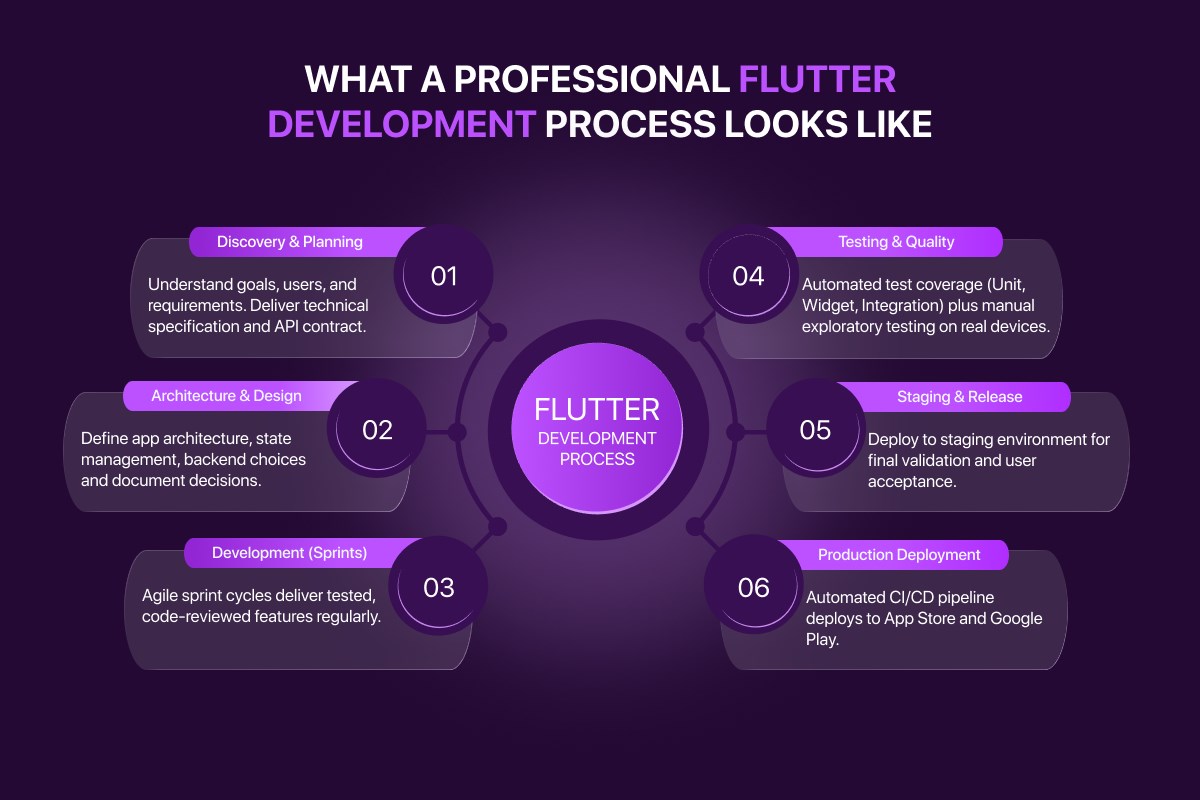
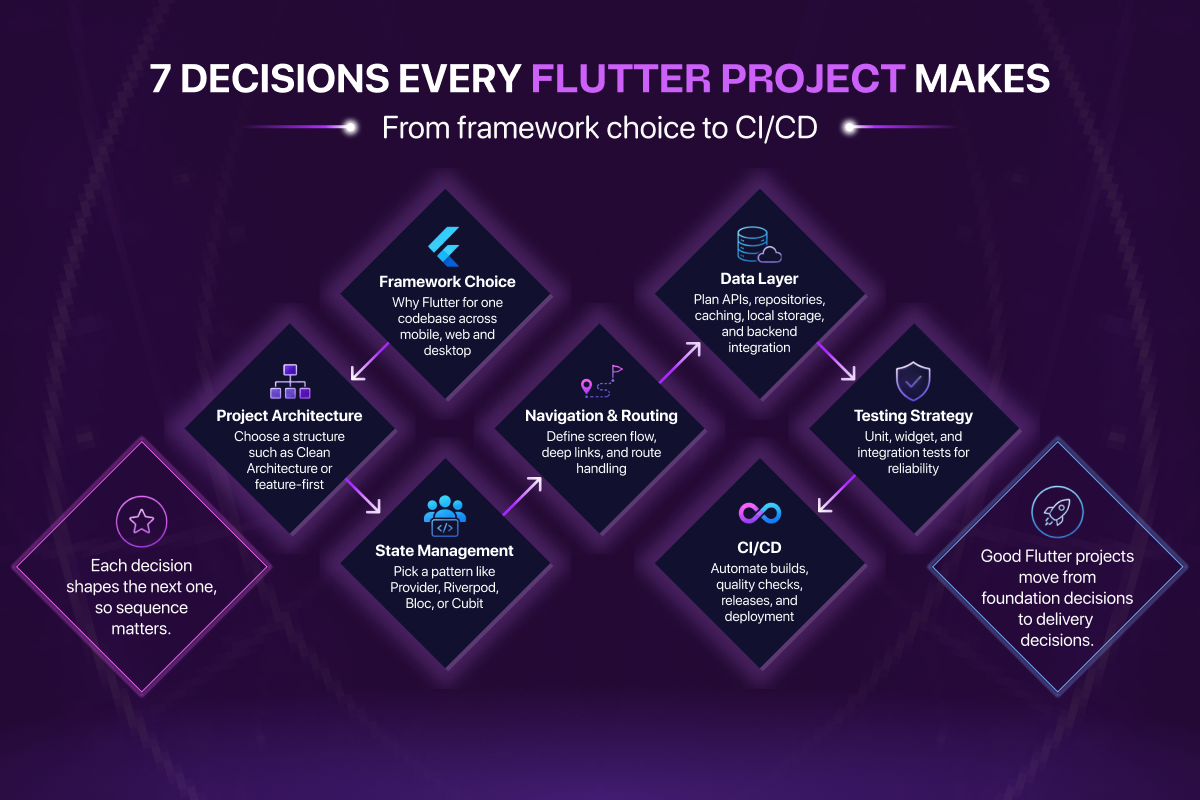
Diagram: the seven sequenced decisions every Flutter project makes, from framework choice through CI/CD.
What Is Flutter and How Does It Work?
Flutter is Google's open-source UI toolkit that compiles a single Dart codebase into natively compiled applications for iOS, Android, web, Windows, macOS, and Linux. The defining architectural decision is that Flutter does not use platform-native UI components. It renders every pixel of every widget itself, using its own graphics engine, originally Skia, now Impeller, directly onto a GPU canvas provided by the operating system.
This means a Flutter button on iOS and a Flutter button on Android are not two different platform components behaving similarly. They are the same widget, drawn by the same engine, producing identical pixels. Visual consistency across platforms is a structural guarantee, not something that requires per-platform adjustment.
Dart, Flutter's programming language, compiles to native ARM machine code on mobile and desktop. There is no interpreter, no JavaScript runtime, no bridge between the application and the processor. This is why Flutter applications achieve the performance characteristics they do, and why the framework can target six platforms from one codebase without sacrificing output quality on any of them.
What Is Flutter, How Google's UI Toolkit Works covers the rendering engine, Dart compilation, Impeller's elimination of shader jank, and how Flutter's platform support compares in full technical detail.
Flutter vs React Native, Which Should You Choose?
Flutter and React Native are the two dominant cross-platform mobile frameworks. Both let a single team ship to iOS and Android. Both are in production at companies with millions of users. Both consistently appear among the most-used non-web frameworks in the Stack Overflow Developer Survey. The decision between them is not a matter of one being universally better, it is a matter of which architectural trade-offs fit your specific project.
The core difference is rendering. React Native uses platform-native components, a <Text> element calls UILabel on iOS and TextView on Android. Flutter renders everything itself. That difference produces three downstream consequences that drive the decision:
UI consistency, Flutter guarantees identical output across platforms by design. React Native requires active effort to maintain visual parity because platform components render with their own native variations.
Performance ceiling, Flutter compiles to native ARM code with no bridge. React Native's New Architecture has closed performance gaps significantly, but Flutter still leads on complex animations and continuous gesture-driven rendering.
Platform coverage, Flutter supports six stable platforms including Windows, macOS, and Linux. React Native's primary targets are iOS and Android. Desktop support in React Native is a community effort, not a first-party release.
React Native's advantage is JavaScript. Teams with existing web development expertise face a significantly lower onboarding barrier than learning Dart. If your team writes React today and your application primarily uses standard platform UI components, React Native deserves serious consideration.
Flutter vs React Native, Which Should You Choose covers the full architectural comparison, performance benchmarks, platform coverage breakdown, and a clear decision framework with concrete criteria for each choice.
Flutter App Architecture, How to Structure a Flutter Project
Flutter does not enforce an architecture. The framework gives you widgets, a build system, and a rendering engine, how you organise the code that drives those widgets is entirely up to the development team. That freedom is the source of most long-term maintainability problems in Flutter projects built without a deliberate architectural decision upfront.
The architecture pattern recommended for production Flutter applications is Clean Architecture, an approach that organises the codebase into three distinct layers with strict rules about which direction dependencies can point.
The Presentation layer contains widgets, screens, and the ViewModels or Cubits that hold UI state. No business logic belongs here.
The Domain layer contains use cases and entity models, pure Dart with no Flutter imports and no external dependencies. This layer defines what the application does, independent of how it displays data or where data comes from. It is the easiest layer to unit test and the most important to get right.
The Data layer contains repository implementations, API clients, and local database access. It knows how data is fetched and stored. The domain layer never knows the implementation details, it only ever calls a repository interface it defines itself.
The dependency rule is absolute: outer layers depend on inner layers, never the reverse. This single constraint is what makes every layer independently testable and independently replaceable.
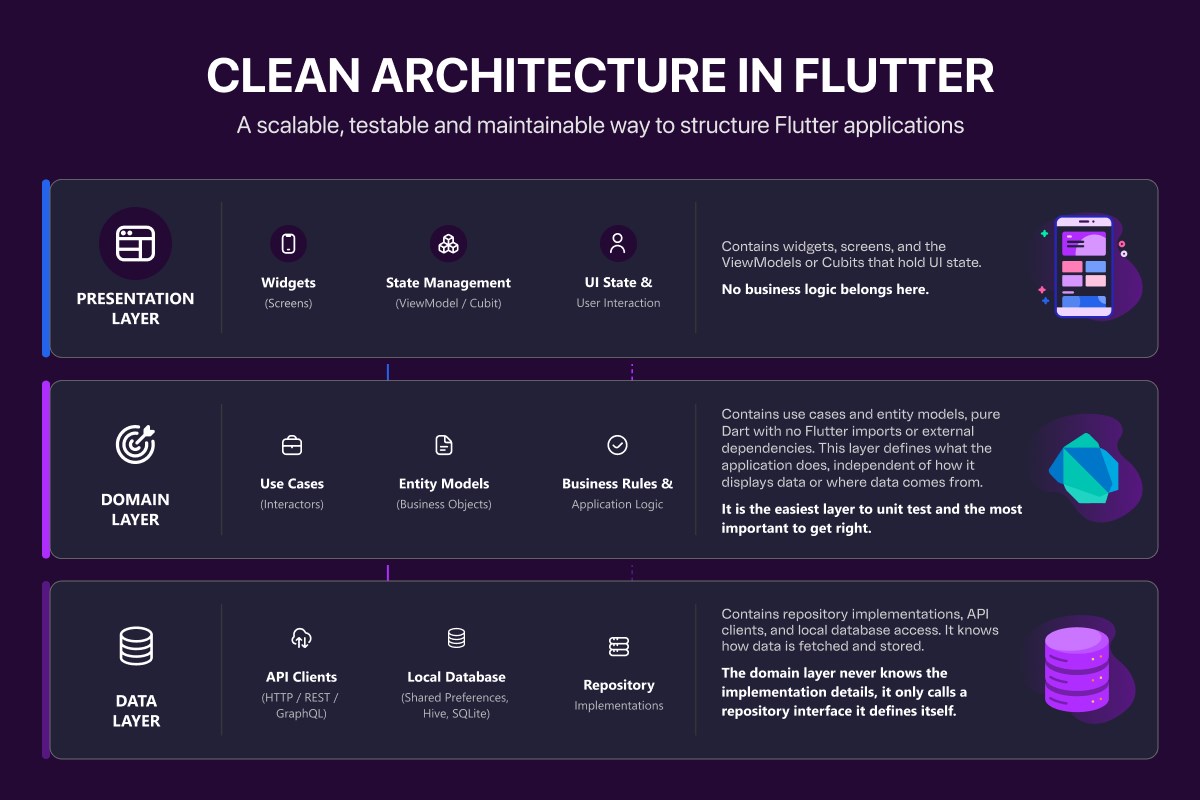
Flutter Clean Architecture, A Complete Guide With Examples covers each layer in full with real Dart code, feature-first folder structure, dependency injection with get_it and injectable, and error handling with the Either type.
Flutter State Management, Bloc vs Riverpod
State management is the mechanism by which a Flutter application tracks changing data and reflects those changes in the UI. When a user logs in, the navigation layer, the home screen, and the app bar all need to reflect that change simultaneously, without each widget making its own API call or receiving the data through a chain of constructor parameters.
Flutter has more state management options than almost any other framework. For production applications, two are worth serious consideration: Bloc and Riverpod.
Bloc uses a stream-based event and state model. Every state change is the result of an explicit, named event dispatched from the UI. The Bloc processes the event and emits a new state. This strict separation makes Bloc applications predictable, auditable, and well-suited to large teams where multiple developers work on shared features. Every state transition has a name, a cause, and a logged record.
Riverpod uses reactive providers and notifiers. State is held in providers defined outside the widget tree and accessible anywhere without BuildContext. Less boilerplate than Bloc, built-in dependency injection, and a composability model that scales naturally as features are added. Better suited to smaller teams and applications where iteration speed matters more than strict auditability.
The right choice depends on team size, application complexity, and whether your domain has compliance or audit requirements. Both are production-grade. Neither is universally correct.
Flutter Bloc vs Riverpod, Which State Management Should You Choose covers both approaches with full Dart code examples, a side-by-side comparison table across nine dimensions, and a concrete decision framework.
Flutter Firebase Integration, What It Covers and How It Works
Most Flutter applications need a backend, authentication, a database, push notifications, crash reporting. Building and managing custom server infrastructure to deliver all of these is significant engineering investment that most teams do not need to make, particularly early in a product's lifecycle.
Firebase is Google's managed application platform that integrates directly with Flutter through the official FlutterFire plugin collection. The seven services most commonly used in Flutter applications are:
- Firebase Authentication, email, phone, Google, Apple, and anonymous sign-in
- Cloud Firestore, NoSQL document database with real-time sync and offline persistence
- Realtime Database, Firebase's original JSON tree database, suited to very high-frequency simple writes
- Cloud Functions, server-side Node.js logic without managing infrastructure
- Firebase Cloud Messaging, push notifications on iOS and Android
- Crashlytics, real-time crash reporting with stack traces and affected user counts
- Remote Config, feature flags and configuration changes without an app store release
Firebase is the right backend choice for most Flutter applications from MVP through to meaningful production scale. The signals that indicate a custom backend is needed, high read volumes hitting cost thresholds, complex relational queries Firestore cannot support, strict data residency requirements, typically appear well after the initial launch.
Flutter Firebase Integration, Complete Setup Guide covers FlutterFire CLI setup, real Dart code for every service, Firestore vs Realtime Database decision criteria, security rules, and a clear framework for when Firebase is no longer the right tool.
Flutter Performance Optimisation, How to Identify and Fix Performance Issues
Flutter's performance ceiling is close to native. But that ceiling is only reached when the widget tree is structured correctly and the four most common performance problems are actively prevented.
The four problems and their fixes in brief:
Excessive widget rebuilds, widgets rebuilding when the data they display has not changed. Fixed with const constructors, BlocSelector for Bloc, and select() for Riverpod, each ensuring widgets rebuild only in response to the specific data they display.
Unvirtualised lists, using ListView instead of ListView.builder constructs every list item at build time regardless of visibility. For any list with more than a handful of items, ListView.builder is not optional.
Unoptimised images, loading remote images without caching, without decoding at display size, and without WebP format. The cached_network_image package with memCacheWidth and memCacheHeight configured to match display dimensions addresses all three.
Undisposed controllers, AnimationController, TextEditingController, and StreamSubscription instances that are never disposed continue consuming memory after the widget that created them leaves the tree. Every initState() that creates a controller needs a matching dispose().
The tool for identifying all four problems before guessing is Flutter DevTools, specifically the Timeline View for frame drops and the Memory tab for leak detection. Always profile in --profile mode on a physical device. Debug mode adds overhead that makes performance numbers meaningless.
Flutter Performance Optimisation, A Complete Guide With DevTools covers the full profiling workflow, before-and-after code for every fix, the pre-release performance checklist, and Dart isolates for CPU-intensive background work.
Flutter Testing, Unit Tests, Widget Tests and Integration Tests
A Flutter codebase without automated tests is not a fast-moving codebase, it is one where the cost of every bug has been deferred to the moment it is hardest and most expensive to fix. Flutter provides a complete, first-class testing framework that covers every layer of a Clean Architecture application.
Unit tests verify business logic in complete isolation. Use cases, Blocs, and Riverpod providers are tested with mocked dependencies using mocktail or mockito. No device, no network, no database, just the logic and a controlled response from a mock. The bloc_test package provides a purpose-built API for verifying Bloc event and state sequences.
Widget tests verify that a widget renders correctly and responds to interactions as expected, in a simulated environment without a real device. Golden tests extend this to visual regression, rendering a widget and comparing it to a saved reference image so that any unintended visual change fails the test suite automatically.
Integration tests verify complete user flows, authentication through to the home screen, onboarding through to the first meaningful action, on a real device or emulator using the integration_test package. Five to ten carefully chosen integration tests covering the highest-impact user flows provide more confidence than fifty tests covering edge cases already handled by unit tests.
Realistic coverage targets: 90%+ on the domain layer, 70-80% on the data layer, 60-70% on the presentation layer, and integration tests on every flow where a failure would have direct user or revenue impact.
Flutter App Testing, Unit, Widget and Integration Tests Explained covers all three testing layers with complete, production-grade Dart code, golden test setup, CI integration with GitHub Actions, and the five most common testing mistakes to avoid.
Flutter CI/CD, Automating App Store and Google Play Deployment
Manual deployment is not a release process, it is a liability. It makes releases infrequent because they are painful, and infrequent releases mean larger changes per release, which means higher risk per release. The standard for production Flutter applications is a fully automated pipeline that runs tests, builds signed binaries, and distributes to testers or submits to app stores on every merge to main.
The standard Flutter CI/CD stack is GitHub Actions for pipeline orchestration and Fastlane for platform-specific iOS and Android deployment steps.
Fastlane handles everything the Flutter build system cannot, code signing certificate management through Fastlane Match, IPA building through Gym, TestFlight distribution through Pilot, and Google Play submission through Supply. Match stores all certificates in a private encrypted Git repository, making signing reproducible on any machine or CI environment without manual Xcode configuration.
GitHub Actions runs the pipeline, installing Flutter, running flutter test, building the platform binaries, and invoking Fastlane, on every push to main. Pull requests get the test suite only. Merges to main get the full build and deploy. Both iOS and Android jobs run in parallel, making the total pipeline time typically 15 to 20 minutes.
Build flavors using --dart-define flags ensure that development, staging, and production builds point to different API endpoints and Firebase projects, with no risk of a staging build reaching production infrastructure.
Flutter CI/CD With Fastlane and GitHub Actions, Complete Setup Guide covers the complete Fastfile for iOS and Android, the full GitHub Actions YAML, Fastlane Match setup, Android keystore management as encrypted CI secrets, build flavor configuration, version bumping automation, and phased rollout setup for both App Store and Google Play.
How to Hire a Flutter App Development Company, What to Look For
The Flutter ecosystem has grown large enough that many agencies claim Flutter as a capability. Evaluating whether a team has genuine production Flutter experience, as opposed to surface-level familiarity, requires asking specific questions and knowing what good answers sound like.
Five Questions to Ask a Flutter Development Company
1. Which state management do you use and why, Bloc or Riverpod? A team with real production Flutter experience has a considered opinion. "We use whatever the client prefers" is not an answer, it indicates a team that has not built enough Flutter applications to form one. The right answer names a primary approach, explains the reasoning, and articulates the trade-offs clearly.
2. How do you handle CI/CD deployment to App Store and Google Play? The answer should describe a specific, automated pipeline, Fastlane, GitHub Actions or equivalent, and Fastlane Match for code signing. Manual deployment processes indicate a junior team or an agency treating Flutter as a secondary capability.
3. What architecture pattern do you follow, and can you show an example? Clean Architecture with clear layer separation is the expected answer. Ask to see a real project folder structure. "We write widgets and call APIs from them" is the wrong answer.
4. How do you test Flutter apps, unit, widget, and integration? All three layers should be named. The packages used, flutter_test, mocktail or mockito, bloc_test, integration_test, should be mentioned without prompting. A team that mentions only manual testing is not production-ready.
5. Can you show a deployed Flutter app on both iOS and Android? Live App Store and Google Play links are the clearest signal of real delivery experience. Screenshots are not sufficient.
Red Flags to Watch For When Evaluating Flutter Developers
No opinion on state management, Flutter teams with production experience form opinions through that experience. No opinion means no experience.
No mention of Fastlane or GitHub Actions, manual app deployments indicate a team that has never maintained a Flutter application through its production lifecycle.
No widget or integration testing, a codebase without automated tests accumulates bugs that are invisible until they reach production users.
"We build in Flutter and React Native equally", Flutter specialists make a recommendation based on project requirements. Teams that offer both as neutral, equivalent options either lack specialisation in either or are prioritising client acquisition over technical honesty.
See our Flutter development process and portfolio for how ETechViral approaches every Flutter engagement, from architecture decision to production deployment.
Summary and Next Steps
Flutter is the technically strongest cross-platform framework available for production mobile, desktop, and web development today. The framework choice is rarely the bottleneck. Architecture, state management, testing discipline, and deployment automation are what separate Flutter applications that perform reliably at scale from those that become difficult to maintain after the first six months of active development.
If you are building for a regulated sector, the compliance and architecture requirements change. We cover those separately in our Flutter healthcare app development guide and our Flutter fintech app development guide.
The decisions covered in this guide, in the order they should be made:
- Framework, Flutter vs React Native, based on rendering requirements, team background, and platform targets
- Architecture, Clean Architecture with feature-first folder structure, before the first feature is built
- State management, Bloc for large teams with complex domains, Riverpod for smaller teams and faster iteration
- Backend, Firebase for most applications through to meaningful scale, custom backend when the specific thresholds are crossed
- Performance, profiled with DevTools, fixed structurally, verified before every release
- Testing, unit tests on the domain layer first, widget tests on shared components, integration tests on the highest-impact flows
- CI/CD, automated before the first public release, not after
Frequently Asked Questions About Flutter App Development
Is Flutter good for production-grade enterprise applications?
Yes. Flutter is used in production at Google (parts of Google Pay), Alibaba (Xianyu app with 50M+ users), Nubank (one of the world's largest digital banks), BMW, and eBay Motors. With a deliberate architecture choice, Clean Architecture, the right state management for your team size, modular packaging, Flutter scales reliably to enterprise applications with millions of users, complex domains, and strict compliance requirements.
How long does it take to build a production-ready Flutter app?
A focused MVP with authentication, a primary user flow, and a single platform target typically takes 8-12 weeks with an experienced Flutter team. A full production application with multiple flows, both iOS and Android, automated CI/CD, and integration testing typically takes 16-24 weeks. Timeline depends most heavily on the complexity of the domain and the maturity of the design and product requirements before development begins.
Should we use Flutter or hire native iOS and Android developers separately?
For the vast majority of applications, a single Flutter team is more cost-effective and delivers faster than two separate native teams. The exceptions are applications that heavily depend on platform-specific APIs that have limited Flutter plugin support, or applications where each platform has fundamentally different UX requirements that make a shared codebase counterproductive. For consumer apps, productivity tools, e-commerce, content, and most B2B applications, Flutter is the correct choice.
What's the learning curve for developers new to Flutter?
Developers with experience in any statically typed language, Java, Swift, Kotlin, TypeScript, C#, typically reach productive Dart and Flutter fluency within one to two weeks. The framework's widget composition model takes longer to internalise than the language itself; expect six to eight weeks before a developer is making architecturally sound decisions on their own. Pair-programming with an experienced Flutter engineer accelerates this significantly.
Can a Flutter app share code with a web or desktop version?
Yes. Flutter supports six stable platforms, iOS, Android, web, Windows, macOS, and Linux, from a single Dart codebase. The business logic, state management, and data layer are typically 100% shared. The presentation layer needs adaptive layouts to handle different screen sizes and input models (touch vs keyboard and mouse), but the underlying widgets and rendering remain identical across platforms.
How much does Flutter app development cost?
Cost is determined by scope, team experience, and timeline rather than the framework choice. A Flutter MVP typically costs 30-50% less than the equivalent native iOS + Android development because one team builds both platforms simultaneously. For a precise estimate based on your specific feature set, design complexity, and integration requirements, our Flutter team offers free scoping consultations.
What about Flutter for AI and machine learning applications?
Flutter integrates cleanly with on-device ML through TensorFlow Lite, and with cloud AI services through standard HTTP clients. For applications that combine Flutter with LLM features, vector search, or generative AI workflows, see our AI app development services. The architectural separation Clean Architecture provides, particularly the data layer abstraction, makes swapping in different AI providers straightforward as the model ecosystem evolves.