Flutter Firebase Integration: Complete Setup Guide
Flutter Firebase integration end to end: Auth, Firestore, Cloud Functions, FCM, Crashlytics, Remote Config with Dart code and switch-out signals.
Most Flutter applications need a backend. User authentication, persistent data storage, push notifications, crash reporting, remote configuration, these are not optional features for production applications. Building and managing custom server infrastructure to deliver all of them is a significant investment in time, cost, and operational complexity that most teams do not need to make, especially early in a product's life.
- FlutterFire is the official Flutter plugin collection for Firebase, maintained by Google's Firebase team.
- The seven Firebase services most commonly used in Flutter apps are Authentication, Firestore, Realtime Database, Cloud Functions, Cloud Messaging (FCM), Crashlytics, and Remote Config.
- Firestore is the right default database for Flutter; Realtime Database is reserved for very high-frequency simple writes.
- Cloud Functions removes the need to manage server infrastructure for backend logic, scheduled jobs, and webhooks.
- Firebase is the right backend for most Flutter apps from MVP through meaningful production scale. Switch to a custom backend only when read costs, complex relational queries, or data residency cross specific thresholds.
- What Is FlutterFire
- Initial Setup, The FlutterFire CLI
- Firebase Authentication
- Cloud Firestore, The Primary Flutter Database
- Firestore vs Realtime Database
- Firebase Cloud Functions
- Firebase Cloud Messaging, Push Notifications
- Firebase Crashlytics
- Firebase Remote Config
- Firebase vs Custom Backend, When to Switch
- Next Steps
- Frequently Asked Questions
Firebase is Google's managed application development platform, a collection of backend services that integrate directly with Flutter through the official FlutterFire plugin collection. A Flutter application with Firebase can have working authentication, a real-time database, push notifications, and crash reporting running in production without a single line of custom server code.
This article covers every Firebase service commonly used in Flutter applications, what each one does, how it integrates, when to use it, and when Firebase is no longer the right tool and a custom backend is needed. The official FlutterFire documentation covers every plugin in depth, and the Firebase pricing page is essential reading before committing to a paid tier.
This article is part of our Complete Guide to Flutter App Development. Firebase sits in the data layer of a well-structured Flutter project, if you have not yet made your architecture decision, read our Flutter Clean Architecture guide first. Once your Firebase integration is working, your CI/CD pipeline needs to handle environment-specific Firebase configurations across dev, staging, and production, our Flutter CI/CD guide covers that in detail. And because Firestore real-time listeners can trigger frequent widget rebuilds, our Flutter performance optimisation guide shows how to profile and fix rebuild-heavy screens.
Ready to build? Our Flutter development team is available for a free consultation.
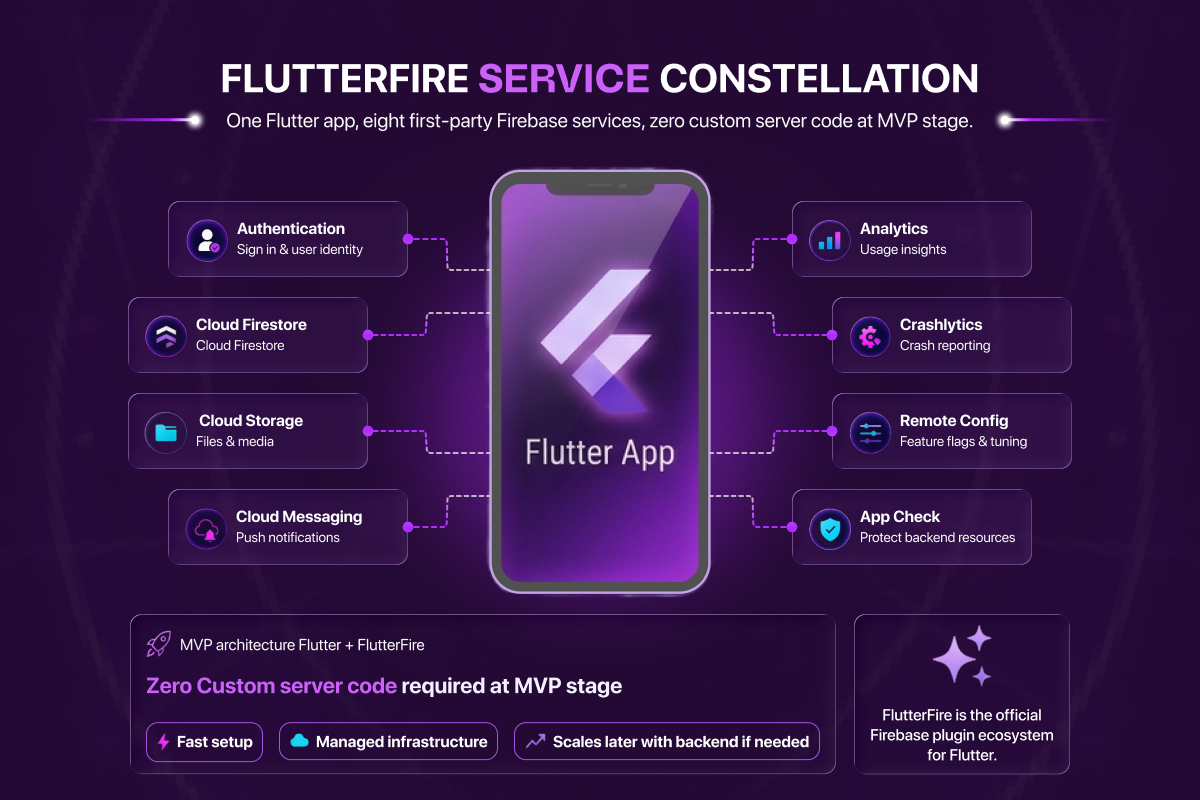
Diagram: the FlutterFire service constellation. One Flutter app, eight first-party Firebase services, zero custom server code at MVP stage.
What Is FlutterFire
FlutterFire is the official collection of Flutter plugins for Firebase, maintained by the Firebase team at Google. Each Firebase service has a corresponding FlutterFire plugin, firebase_auth for authentication, cloud_firestore for the Firestore database, firebase_messaging for push notifications, and so on.
FlutterFire provides type-safe Dart APIs for every Firebase service, handles platform-specific configuration for iOS and Android automatically through the FlutterFire CLI, and is updated alongside Firebase itself. It is the only recommended integration path for Flutter and Firebase, third-party Firebase wrappers exist but are unnecessary and unmaintained by comparison.
Initial Setup, The FlutterFire CLI
The FlutterFire CLI is the recommended way to configure Firebase in a Flutter project. It connects your Flutter project to a Firebase project and generates the firebase_options.dart file that contains platform-specific configuration for iOS, Android, and web, replacing the manual process of downloading GoogleService-Info.plist and google-services.json files and placing them in the correct directories.
# Install the FlutterFire CLI
dart pub global activate flutterfire_cli

# Configure your Flutter project with Firebase
flutterfire configure
The CLI prompts you to select a Firebase project, selects the platforms to configure, and generates firebase_options.dart automatically. This file is then passed to Firebase.initializeApp() at application startup:
// lib/main.dart
import 'package:firebase_core/firebase_core.dart';
import 'firebase_options.dart';

void main() async {
  WidgetsFlutterBinding.ensureInitialized();
  await Firebase.initializeApp(
    options: DefaultFirebaseOptions.currentPlatform,
  );
  runApp(const MyApp());
}
One firebase_options.dart file contains configuration for all platforms. The CLI handles the rest.
Firebase Authentication, Handling User Identity
Firebase Authentication handles the full user identity lifecycle, sign-up, sign-in, password reset, token refresh, and sign-out, across multiple authentication providers without custom server code.
Supported Sign-In Methods
- Email and password, the standard sign-in method. Firebase handles password hashing, storage, and reset email delivery.
- Phone number, SMS-based one-time password authentication. Firebase handles SMS delivery and code verification. Requires App Check configuration for production.
- Google Sign-In, OAuth 2.0 sign-in with a Google account. Requires the
google_sign_inpackage alongsidefirebase_auth. - Apple Sign-In, required by Apple for iOS applications that offer any social sign-in option. Uses the
sign_in_with_applepackage. - Anonymous sign-in, creates an unauthenticated session with a unique user ID. Useful for applications that allow users to use core features before creating an account, with the ability to upgrade the anonymous account to a permanent one later.
Firebase Auth in Code
// data/datasources/auth_remote_datasource.dart
import 'package:firebase_auth/firebase_auth.dart';

class AuthRemoteDataSource {
  final FirebaseAuth _auth = FirebaseAuth.instance;

  // Email and password sign-in
  Future<UserCredential> signInWithEmailAndPassword({
    required String email,
    required String password,
  }) async {
    return await _auth.signInWithEmailAndPassword(
      email: email,
      password: password,
    );
  }

  // Observe auth state changes
  Stream<User?> get authStateChanges => _auth.authStateChanges();

  // Sign out
  Future<void> signOut() async => await _auth.signOut();
}
The authStateChanges stream is the correct way to observe authentication state in a Flutter application, it emits a User object when a user is signed in and null when they are signed out. In a Clean Architecture application, this stream is consumed by an AuthRepository in the data layer and exposed to the domain layer through a repository interface.
Security Rules and Auth Integration
Firebase Authentication integrates directly with Firestore and Firebase Storage security rules. You can restrict read and write access to documents based on the authenticated user's identity without writing any server-side authorisation code:
// Firestore security rules
rules_version = '2';
service cloud.firestore {
  match /databases/{database}/documents {
    match /users/{userId} {
      allow read, write: if request.auth != null
                         && request.auth.uid == userId;
    }
  }
}
This rule allows a user to read and write only their own user document. Any attempt to access another user's document is rejected at the Firebase layer before it reaches your application.
Cloud Firestore, The Primary Flutter Database
Cloud Firestore is Firebase's primary NoSQL document database and the recommended database choice for most new Flutter projects. Data is organised in collections containing documents. Each document is a set of key-value pairs, similar to a JSON object. Documents can contain subcollections, enabling hierarchical data structures.
Firestore Core Operations
// data/datasources/user_remote_datasource.dart
import 'package:cloud_firestore/cloud_firestore.dart';
import '../models/user_model.dart';

class UserRemoteDataSource {
  final FirebaseFirestore _firestore = FirebaseFirestore.instance;

  // Write a document
  Future<void> createUser(UserModel user) async {
    await _firestore
        .collection('users')
        .doc(user.id)
        .set(user.toJson());
  }

  // Read a document once
  Future<UserModel> getUser(String userId) async {
    final doc = await _firestore
        .collection('users')
        .doc(userId)
        .get();
    if (!doc.exists) throw Exception('User not found');
    return UserModel.fromJson(doc.data()!);
  }

  // Real-time stream of a document
  Stream<UserModel> watchUser(String userId) {
    return _firestore
        .collection('users')
        .doc(userId)
        .snapshots()
        .map((doc) => UserModel.fromJson(doc.data()!));
  }

  // Query a collection
  Future<List<UserModel>> getUsersByRole(String role) async {
    final snapshot = await _firestore
        .collection('users')
        .where('role', isEqualTo: role)
        .orderBy('createdAt', descending: true)
        .limit(20)
        .get();
    return snapshot.docs
        .map((doc) => UserModel.fromJson(doc.data()))
        .toList();
  }
}
Real-Time Listeners
Firestore's defining feature for mobile applications is real-time data synchronisation. The .snapshots() stream on any document or collection query emits a new value whenever the underlying data changes in Firestore, from any client, anywhere. A chat message sent from one device appears on another device's screen in under 100ms without any polling or manual refresh.
In a Clean Architecture Flutter application, this stream flows from the data source through the repository to a Bloc or Riverpod provider, which rebuilds the relevant widget automatically when new data arrives.
Offline Persistence
Firestore includes built-in offline persistence for mobile platforms. When the device is offline, Firestore serves data from a local cache and queues write operations. When connectivity is restored, queued writes are applied in order and the local cache is synchronised. For most Flutter applications, offline persistence requires zero configuration, it is enabled by default on iOS and Android.
Firestore vs Realtime Database, Which to Use
Firebase offers two database products. Choosing between them matters.
Cloud Firestore is the correct choice for virtually all new Flutter projects. It supports rich queries across multiple fields, scales horizontally without configuration, has a more expressive security rules system, and handles structured data with subcollections more naturally than the Realtime Database.
Firebase Realtime Database is Firebase's original database product. Its data model is a single large JSON tree. It has lower latency than Firestore for simple key-value reads and writes, typically under 50ms versus Firestore's 100-200ms, and is better suited to applications that require very high-frequency updates on simple data, such as live cursor positions or real-time multiplayer game state.
Use Firestore unless you have a specific, measured requirement for the lower latency that only Realtime Database provides.
Firebase Cloud Functions, Server-Side Logic Without Servers
Firebase Cloud Functions run Node.js code in Google's managed infrastructure without provisioning or managing servers. In a Flutter application, Cloud Functions handle the server-side work that should not run on the client.
When to Use Cloud Functions
Sending notifications on data changes, when a new message is added to a Firestore conversation, a Cloud Function triggers and sends a push notification to the other participants. The notification logic runs server-side, not on the sending client.
Processing payments, Stripe payment intents should be created server-side to protect your Stripe secret key. A Cloud Function creates the payment intent and returns the client secret to the Flutter application.
Validating complex business rules, rules that involve data from multiple collections, external API calls, or operations that should not be visible to the client belong in Cloud Functions.
Scheduled background jobs, nightly data aggregation, expiring promotions, sending reminder emails, all schedulable through Cloud Functions with Firebase's pubsub trigger.
// functions/src/index.ts
import * as functions from 'firebase-functions';
import * as admin from 'firebase-admin';

admin.initializeApp();

// Trigger on new Firestore document
export const onNewMessage = functions.firestore
  .document('conversations/{conversationId}/messages/{messageId}')
  .onCreate(async (snapshot, context) => {
    const message = snapshot.data();
    const conversationId = context.params.conversationId;

    // Send FCM notification to other participants
    const conversation = await admin.firestore()
      .collection('conversations')
      .doc(conversationId)
      .get();

    const participants = conversation.data()?.participants ?? [];
    // ... send notification logic
  });
Cloud Functions are deployed separately from the Flutter application and do not require an app store release to update.
Firebase Cloud Messaging, Push Notifications on iOS and Android
Firebase Cloud Messaging (FCM) is the service that delivers push notifications to iOS and Android devices. The firebase_messaging Flutter plugin handles foreground, background, and terminated-state notification delivery.
Notification States in Flutter
A Flutter application can receive FCM messages in three states:
Foreground, the application is open and active. Messages are received through the FirebaseMessaging.onMessage stream. The application handles display, typically showing an in-app notification banner.
Background, the application is open but not in the foreground. Messages are delivered to a background handler. On Android, the system displays the notification automatically. On iOS, the system displays it if the notification has a display title.
Terminated, the application is not running. The system displays the notification. When the user taps it, the application launches and FirebaseMessaging.getInitialMessage() returns the notification that caused the launch.
// Handling all three states

// 1. Foreground messages
FirebaseMessaging.onMessage.listen((RemoteMessage message) {
  // Show in-app notification
});

// 2. Background message handler, must be top-level function
@pragma('vm:entry-point')
Future<void> _firebaseMessagingBackgroundHandler(RemoteMessage message) async {
  await Firebase.initializeApp();
  // Handle background message
}
FirebaseMessaging.onBackgroundMessage(_firebaseMessagingBackgroundHandler);

// 3. Notification tap when app was terminated
final initialMessage = await FirebaseMessaging.instance.getInitialMessage();
if (initialMessage != null) {
  // Navigate to relevant screen
}
iOS Configuration Requirements
iOS push notifications require explicit user permission and APNs (Apple Push Notification service) certificate configuration in the Firebase console. The FlutterFire documentation covers this configuration in detail. Requesting permission should happen at a contextually appropriate moment in the application, not immediately on first launch, which triggers a poor permission grant rate.
Firebase Crashlytics, Crash Monitoring and Error Reporting
Firebase Crashlytics provides real-time crash reporting with stack traces, affected device counts, and affected user counts per crash. It is the most important operational tool for any Flutter application in production.
Setup in Flutter
// main.dart, catch Flutter framework errors
void main() async {
  WidgetsFlutterBinding.ensureInitialized();
  await Firebase.initializeApp(options: DefaultFirebaseOptions.currentPlatform);

  // Pass Flutter framework errors to Crashlytics
  FlutterError.onError = FirebaseCrashlytics.instance.recordFlutterFatalError;

  // Pass async errors not caught by the Flutter framework
  PlatformDispatcher.instance.onError = (error, stack) {
    FirebaseCrashlytics.instance.recordError(error, stack, fatal: true);
    return true;
  };

  runApp(const MyApp());
}
With this configuration, every uncaught Flutter error and every unhandled Dart exception is automatically reported to Crashlytics with a full stack trace, device information, and the sequence of actions the user took before the crash.
Custom Logging
Crashlytics supports custom keys and log messages that appear alongside crash reports:
// Add context before an operation that might fail
FirebaseCrashlytics.instance.setCustomKey('user_id', userId);
FirebaseCrashlytics.instance.setCustomKey('screen', 'checkout');
FirebaseCrashlytics.instance.log('User initiated payment');
When a crash occurs, these values appear in the Crashlytics report, giving you the user's ID, the screen they were on, and the last logged action before the crash. This is the difference between a stack trace you can act on and one you cannot.
Firebase Remote Config, Feature Flags Without App Updates
Firebase Remote Config allows you to change application behaviour and appearance server-side without publishing a new app store release. Values defined in the Firebase console are fetched by the application at startup and cached locally.
// Fetch and activate remote config values
final remoteConfig = FirebaseRemoteConfig.instance;

await remoteConfig.setConfigSettings(RemoteConfigSettings(
  fetchTimeout: const Duration(seconds: 10),
  minimumFetchInterval: const Duration(hours: 1),
));

await remoteConfig.fetchAndActivate();

// Use a remote config value
final showNewOnboarding = remoteConfig.getBool('show_new_onboarding');
final maxUploadSizeMb = remoteConfig.getInt('max_upload_size_mb');
Common use cases for Remote Config in Flutter applications include feature flags for gradual rollouts, A/B testing different UI variants, dynamic content strings for marketing campaigns, and configuration values that need to change without an app release, API endpoints, rate limits, feature thresholds.
Remote Config integrates with Firebase's audience targeting system, allowing you to show different configuration values to different user segments, new users, paying users, users in specific countries, without deploying separate builds.
Firebase vs Custom Backend, When to Switch
Firebase is excellent for early-stage applications, MVPs, and applications that grow to moderate scale. It is not the right tool for every situation at every stage. The signals that indicate it is time to evaluate a custom backend include:
Cost at scale. Firestore's pricing model charges per document read and write. Applications with high read volumes, particularly those with large numbers of real-time listeners on frequently updated documents, can accumulate significant Firebase costs at scale. At a certain read volume, a custom API backed by PostgreSQL becomes cheaper to operate than equivalent Firestore usage.
Complex relational queries. Firestore is a document database. It does not support joins, complex aggregations, or the kinds of multi-table queries that relational databases handle natively. Applications that need to query across multiple related entities, reporting dashboards, analytics features, complex filtering, often hit Firestore's query limitations and require either denormalised data structures or a move to a relational database.
Data residency requirements. Enterprise and regulated applications may have explicit requirements about which country or region their data is stored in. Firestore supports multi-region configurations but does not provide the granular data residency control that some compliance frameworks require.
Existing backend infrastructure. If your organisation already runs a production API, adding a Firebase dependency creates two sources of truth for application data. In this case, integrating Flutter with the existing API through a REST or GraphQL client is typically the right approach rather than introducing Firebase alongside it.
The transition from Firebase to a custom backend is straightforward in a Clean Architecture Flutter application, the Firebase data sources in the data layer are replaced with API client data sources. The domain layer and presentation layer require no changes.
Next Steps
Firebase gives a Flutter application a complete backend, authentication, database, notifications, crash reporting, and remote configuration, without custom server infrastructure. For most applications from MVP through to meaningful production scale, that is exactly the right trade-off.
When your application outgrows Firebase, the architecture that hosted it, Clean Architecture with repository interfaces in the data layer, makes the transition to a custom backend a data layer replacement rather than a full rebuild.
Continue with our Flutter Clean Architecture guide to see how Firebase plugs into the data layer, our Bloc vs Riverpod guide for how Firestore streams feed into state management, or our CI/CD guide for how separate Firebase projects per environment are configured.
Frequently Asked Questions About Flutter Firebase Integration
Is Firebase free for Flutter apps?
Firebase has a generous free tier (Spark plan) that covers MVPs and early-stage production applications. Authentication is free for unlimited users. Firestore allows 50K reads, 20K writes, and 1GB storage per day. FCM (push notifications) is free at any volume. The paid tier (Blaze plan, pay-as-you-go) kicks in only when you exceed these limits, and costs scale linearly with usage.
Should I use Firestore or Realtime Database for my Flutter app?
Use Firestore for almost everything. Firestore has richer queries, better scaling, more expressive security rules, and a more modern data model. The exception is applications requiring very high-frequency updates on simple data (live cursors, real-time multiplayer game state), where Realtime Database's lower latency (~50ms vs ~100-200ms) matters.
How do I handle push notifications when my Flutter app is closed?
Firebase Cloud Messaging delivers notifications in three states: foreground (in-app handler), background (system notification + background handler), and terminated (system notification + getInitialMessage() on next launch). The terminated state requires a top-level background handler function marked @pragma('vm:entry-point'). See the FCM section above for code.
Can I use Firebase with the Bloc or Riverpod state management?
Yes. Firebase data sources sit in the data layer of a Clean Architecture application, completely independent of state management choice. Firestore streams feed into Bloc states or Riverpod providers identically. See our Bloc vs Riverpod guide for how state management connects to data sources.
How do I separate Firebase configurations for dev, staging, and production?
Create three separate Firebase projects (my-app-dev, my-app-staging, my-app-prod) and generate three separate firebase_options.dart files using the FlutterFire CLI. Select the correct one at runtime based on a --dart-define=ENVIRONMENT=... flag set in your CI/CD pipeline. Our Flutter CI/CD guide covers the full setup.
When should I move from Firebase to a custom backend?
Move when one of these specific signals appears: Firestore costs exceed what a custom API would cost (typically high-read applications at scale), you need complex relational queries Firestore cannot support (reporting dashboards, multi-table joins), data residency compliance requires specific regions Firestore does not offer granular enough control over, or your organisation already runs a production backend that should be the single source of truth.
Is Firebase Crashlytics free for Flutter apps?
Yes. Crashlytics is free at any volume on both the Spark and Blaze plans. There is no charge based on number of crashes, affected users, or stack trace volume. Every Flutter app in production should integrate Crashlytics, the cost is zero and the visibility into production crashes is the difference between knowing about a crisis and being blindsided by it.