What Is Flutter: How Google’s UI Toolkit Works
A complete explanation of what Flutter is, the rendering engine (Skia/Impeller), Dart language, six platform targets, and how it differs from React Native.
Flutter is not another cross-platform wrapper. It is a complete UI toolkit built by Google that compiles a single Dart codebase into native applications for iOS, Android, web, Windows, macOS, and Linux. If you are evaluating Flutter for a new project, or trying to understand what your development team means when they recommend it, this article explains exactly how Flutter works, why it renders differently from every other cross-platform framework, and what that means for the applications you build with it.
- Flutter is Google's open-source UI toolkit, released as stable in December 2018, that compiles Dart to native binaries for six platforms.
- Flutter does not call platform-native UI widgets, it renders every pixel through its own engine (Skia, now Impeller) directly onto a GPU canvas.
- Dart compiles to native ARM machine code on mobile and desktop, with no interpreter and no bridge between the app and the processor.
- Production users include Google Pay, Alibaba's Xianyu, Nubank, BMW, and eBay Motors, indicating mature enterprise readiness.
- Flutter is the right choice for most cross-platform projects; it is not the right choice when the project must deeply integrate platform-specific OS UI conventions.
- What Is Flutter, The One-Paragraph Answer
- How Flutter Is Different From Every Other Cross-Platform Framework
- Flutter's Rendering Engine, Skia and Impeller Explained
- What Is Dart and Why Does Flutter Use It
- Which Platforms Does Flutter Support
- How Flutter Compares to React Native
- Who Uses Flutter in Production
- What Flutter Is Not
- Is Flutter the Right Choice for Your Project
- The Next Step
- Frequently Asked Questions
This article is part of our Complete Guide to Flutter App Development, which covers every major Flutter decision from architecture and state management through CI/CD deployment and enterprise scaling. Source references include Flutter's official documentation and Dart language overview. If you are ready to build rather than research, our Flutter app development team is available for a free consultation.
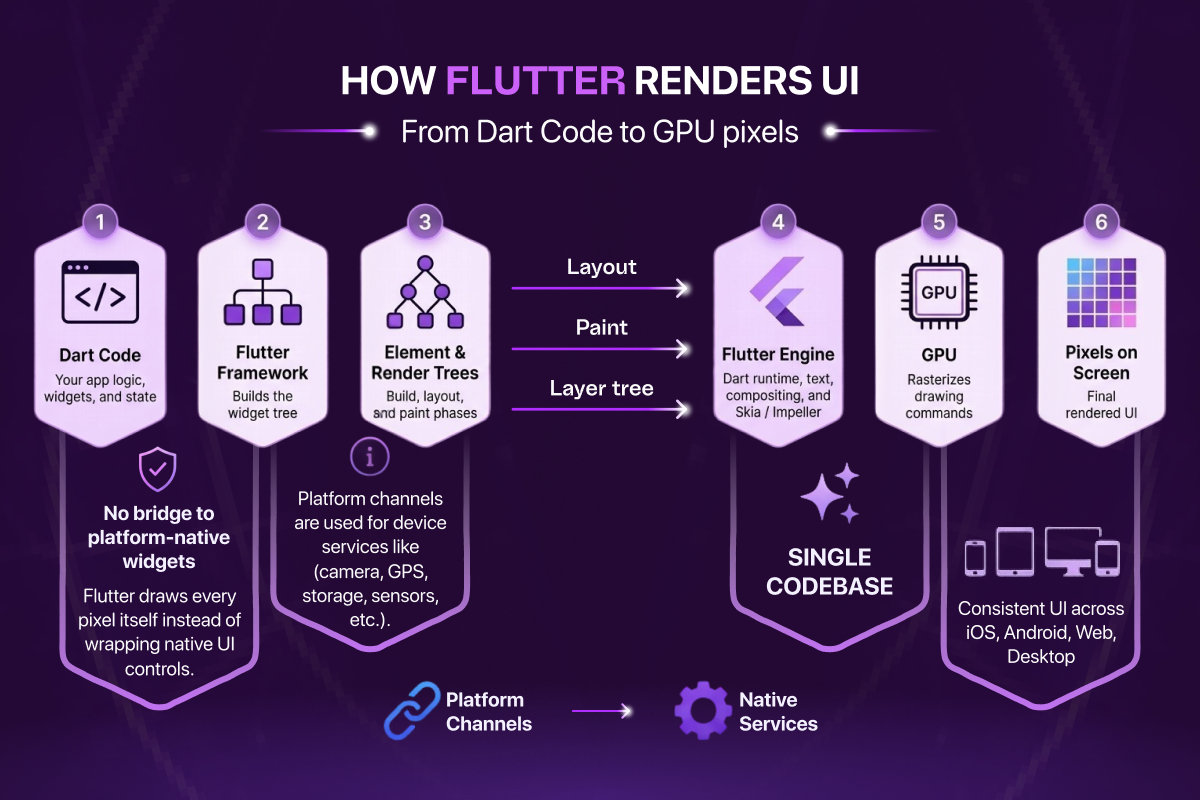
Diagram: how Flutter renders, from Dart code through the Engine to GPU pixels, with no bridge to platform-native widgets.
What Is Flutter, The One-Paragraph Answer
Flutter is Google's open-source UI toolkit, first released in stable form in December 2018. It uses the Dart programming language and allows a single codebase to produce natively compiled applications for six platforms simultaneously. Unlike React Native or Xamarin, Flutter does not use platform-native UI components. Instead, it draws every pixel of every UI element itself using its own graphics engine, Skia, and more recently Impeller. The result is an application that looks and behaves identically on iOS and Android, achieves near-native performance, and does not depend on platform UI changes or updates to remain consistent.
Flutter at a Glance
| Developer | |
|---|---|
| Language | Dart |
| Rendering engine | Impeller (default), Skia (legacy) |
| Platforms | iOS, Android, Web, Windows, macOS, Linux |
| First released | May 2017 (alpha); December 2018 (1.0 stable) |
| License | Free and open-source (BSD 3-clause) |
How Flutter Is Different From Every Other Cross-Platform Framework
To understand Flutter properly, it helps to understand what made every framework before it a compromise.
The traditional approach to cross-platform mobile development was a bridge. React Native, for example, writes UI logic in JavaScript and passes instructions across a bridge to native platform components, UILabel on iOS, TextView on Android. The platform then renders those components using its own native rendering pipeline. This approach has one major advantage, the UI looks like a native iOS or Android app because it literally is one. But it comes with a significant cost: the bridge is an overhead layer, the two platforms render components slightly differently, and any change Apple or Google makes to how their native components look can affect your application's appearance without you changing a line of code.
Flutter took a fundamentally different approach. It eliminated the bridge entirely.
Flutter applications talk directly to the GPU. The framework provides a canvas, a blank surface, and paints every widget, every animation, and every transition frame onto that canvas itself. There is no UILabel. There is no TextView. There is a Flutter Text widget that Flutter draws directly. This means Flutter's rendering is platform-independent by design. A Text widget on iOS and a Text widget on Android are not two different things calling two different APIs, they are the same widget rendered by the same engine producing the same pixels.
This rendering architecture is also why Flutter's app architecture decisions matter so much, when the framework does not impose a structure, the team must choose one deliberately.
Flutter's Rendering Engine, Skia and Impeller Explained
The engine that makes Flutter's direct-to-GPU rendering possible started as Skia, a 2D graphics library that Google also uses in Chrome and Android itself. Skia handles all drawing operations: text, shapes, gradients, images, shadows, and composited layers.
Skia's main limitation in a Flutter context was shader compilation jank. When a complex animation plays for the first time, Skia compiles the GPU shaders required to render it at runtime. On the first run, this compilation causes a brief but visible stutter, a dropped frame or a momentary freeze, even if the rest of the application is perfectly optimised. For consumer applications where smooth first impressions matter, this was a real problem.
Impeller is Flutter's answer to shader jank. Introduced as the default renderer on iOS in Flutter 3.10 and progressively rolled out to Android, Impeller pre-compiles all shaders at application build time rather than at runtime. By the time the application is running on a user's device, every shader it will ever need is already compiled and ready. The result is consistently smooth animation with no first-frame stutter, regardless of how complex the UI is.
Understanding the rendering engine is foundational to understanding Flutter performance optimisation, because how you structure your widget tree determines how much work the engine has to do on every frame.
What Is Dart and Why Does Flutter Use It
Flutter's programming language is Dart, also developed by Google. Dart is a statically typed, object-oriented language with a modern syntax that will feel familiar to anyone who has written Java, TypeScript, or Swift. It was not chosen arbitrarily, several of Dart's specific properties make it well-suited to what Flutter needs to do.
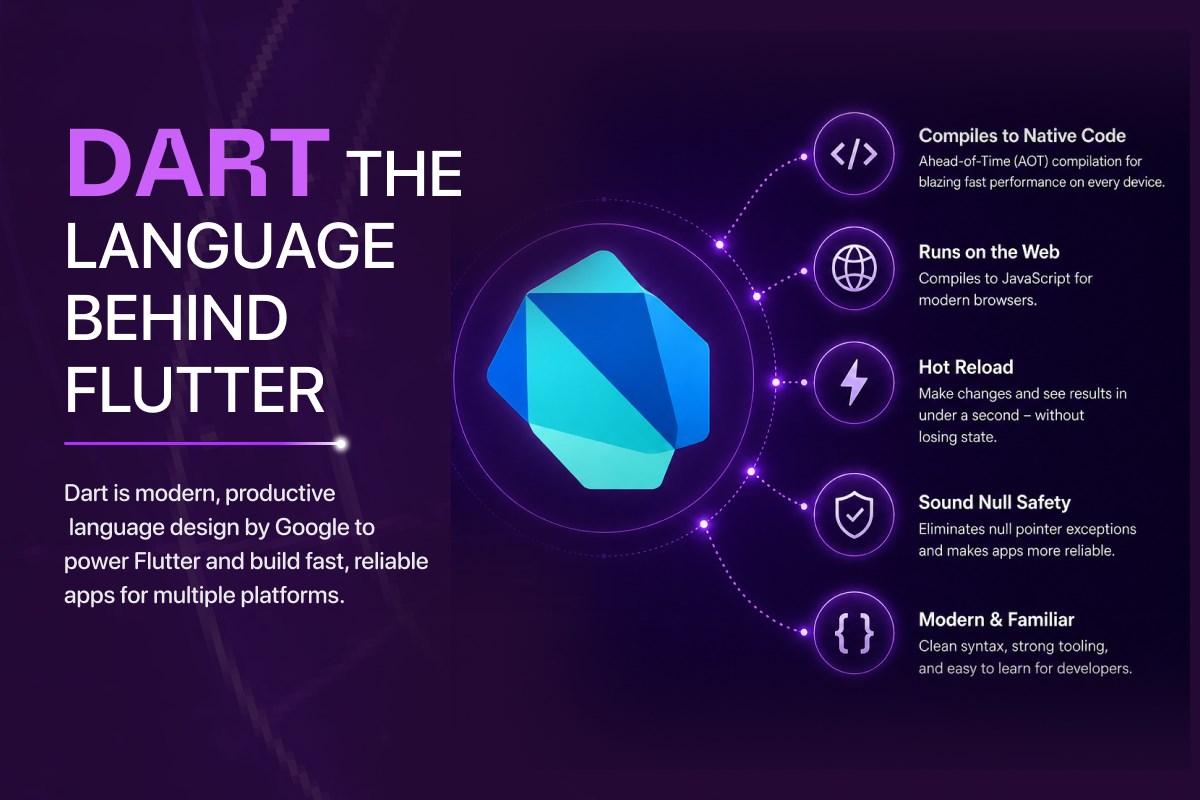
Dart compiles to native ARM machine code on mobile and desktop. Using Dart's Ahead-of-Time (AOT) compiler, a Flutter application for iOS or Android produces a binary that runs directly on the device's processor, no interpreter, no virtual machine, no runtime overhead. This is the technical foundation of Flutter's performance. The application running on the device is native code.
Dart compiles to JavaScript for web. When targeting the web, the Dart compiler produces JavaScript output that runs in any modern browser. This is how Flutter web works, the same Dart codebase, compiled to JavaScript, rendering via Flutter's web canvas renderer.
Dart's JIT compiler powers hot reload. During development, Dart runs in Just-in-Time mode, which allows the Flutter tooling to inject updated code into a running application in under a second, without restarting it, without losing the current application state. This feature, called hot reload, is one of the most practically impactful parts of the Flutter development experience. A developer changes a widget's padding, saves the file, and sees the result on a connected device in less than a second.
Dart has sound null safety. Since Dart 2.12, null safety is mandatory, the Dart type system guarantees that a variable cannot be null unless you explicitly declare it as nullable. This eliminates an entire class of runtime crashes that are common in JavaScript and older typed languages. In a production mobile application, where a null pointer exception means a crash in front of a real user, sound null safety is a meaningful reliability guarantee.
A minimal Flutter app in Dart, note the explicit types, null safety, and widget composition:
import 'package:flutter/material.dart';

void main() => runApp(const MyApp());

class MyApp extends StatelessWidget {
  const MyApp({super.key});

  @override
  Widget build(BuildContext context) {
    return MaterialApp(
      title: 'Hello Flutter',
      theme: ThemeData(useMaterial3: true),
      home: const HomeScreen(),
    );
  }
}

class HomeScreen extends StatelessWidget {
  const HomeScreen({super.key});

  @override
  Widget build(BuildContext context) {
    return Scaffold(
      appBar: AppBar(title: const Text('Hello Flutter')),
      body: const Center(
        child: Text(
          'One codebase. Six platforms.',
          style: TextStyle(fontSize: 24),
        ),
      ),
    );
  }
}
One common concern about Flutter from developers coming from JavaScript ecosystems is Dart's learning curve. In practice, most developers with experience in any typed language report reaching productive Dart fluency within one to two weeks. The language is intentionally unsurprising, it does not introduce unconventional paradigms or syntax that requires significant conceptual adjustment.
Which Platforms Does Flutter Support
Flutter currently targets six platforms as stable, first-party supported targets:
iOS, Flutter produces a native ARM binary submitted to the Apple App Store. UI rendering uses Impeller as the default engine. All Apple platform APIs are accessible through Flutter plugins and the platform channel mechanism.
Android, Flutter produces a native ARM binary for the Google Play Store. Impeller is progressively replacing Skia as the default renderer on Android as well.
Web, Flutter compiles to JavaScript and renders via an HTML canvas or WebAssembly. Web support is stable and production-viable for internal tools, dashboards, and progressive web applications, though it has known limitations compared to mobile for complex applications.
Windows, Flutter produces a native Win32 desktop application. Desktop support became stable with Flutter 3.0 in May 2022. This is a significant differentiator, few cross-platform frameworks offer first-party stable desktop support.
macOS, Flutter produces a native macOS application submittable to the Mac App Store. The same application logic that runs on iOS can be adapted to run on macOS with relatively modest effort.
Linux, Flutter produces a native GTK-based desktop application for Linux distributions. Stability is on par with Windows and macOS.
The ability to target all six platforms from a single Dart codebase does not mean a single UI works perfectly on every platform without modification. Screen sizes, input models (touch vs keyboard and mouse), and platform conventions differ meaningfully between mobile, web, and desktop. Skilled Flutter teams build adaptive layouts that respond to these differences while sharing the underlying business logic, state management, and data layer across all targets.
How Flutter Compares to React Native
The most common comparison Flutter faces is with React Native. The architectural difference is what matters most: React Native uses platform-native components and a JavaScript bridge, Flutter renders everything itself using its own engine. This means Flutter has stronger UI consistency guarantees across platforms, higher performance ceilings for complex UI work, and broader stable platform support including desktop. React Native has a larger JavaScript ecosystem and a lower onboarding barrier for teams with existing JavaScript expertise.
Neither is universally the right choice, the decision depends on your team background, your UI requirements, and your target platforms. For a full technical breakdown with side-by-side comparison across performance, ecosystem, and platform coverage, see our dedicated article: Flutter vs React Native, Which Should You Choose.
Who Uses Flutter in Production
Flutter's adoption at scale is no longer a question. Google itself ships multiple production applications on Flutter, including parts of Google Pay. Alibaba's Xianyu application, used by over 50 million users, was one of the earliest large-scale Flutter deployments. BMW, eBay Motors, Nubank (one of the world's largest digital banks with over 80 million customers), and the Hamilton musical application are among the well-documented production Flutter deployments.
Flutter has consistently ranked among the most popular cross-platform mobile frameworks in developer surveys, including Stack Overflow's annual developer survey, where it has ranked as the most popular cross-platform framework by usage among professional developers for multiple consecutive years.
What Flutter Is Not
Flutter is not a web-first framework. It was designed for native mobile and desktop first. Web support is real and production-viable for the right use cases, but teams looking to build primarily for the browser would evaluate Flutter web alongside purpose-built web frameworks rather than treating it as the default choice.
Flutter is not a low-code tool. Building with Flutter requires Dart programming knowledge and an understanding of widget composition, state management, and the Flutter rendering model. It is a professional software development framework intended for professional development teams.
Flutter is not limited to simple applications. The architecture patterns that scale in Flutter, Clean Architecture, Bloc or Riverpod for state management, modular packaging for large teams, are the same patterns used in enterprise applications with compliance requirements, multi-team development, and millions of active users. If you want to understand how those architecture decisions work in practice, our Flutter architecture guide covers them in detail.
Is Flutter the Right Choice for Your Project
Flutter is the right technical choice when:
- You are building a mobile application for both iOS and Android and want one team, one codebase, and one set of tests
- Your UI requires pixel-perfect consistency between platforms, particularly for branded consumer applications
- Your application includes complex animations, gesture-driven interactions, or custom drawn UI components
- Your project scope includes a desktop target, Windows, macOS, or Linux, alongside mobile
- You are starting from scratch with no existing JavaScript codebase that would benefit from React Native's JavaScript continuity
Flutter may not be the right choice when:
- Your team has deep React Native expertise and no Dart experience, and project timelines do not allow for the transition
- Your application is primarily web-first with mobile as a secondary consideration
- You are building a simple form-based internal tool where platform-native UI components are entirely sufficient
The Next Step
Understanding what Flutter is, its rendering engine, its language, its platform support, and how it differs from every other cross-platform option, is the foundation for every technical decision that follows. Architecture, state management, testing, and deployment are all downstream of this choice.
Frequently Asked Questions About Flutter
Is Flutter a programming language?
No. Flutter is a UI toolkit, a framework. The programming language Flutter uses is Dart, also developed by Google. Dart provides the language (variables, classes, async/await, null safety); Flutter provides the widgets, rendering engine, and platform integration that turn Dart code into native applications.
Is Dart hard to learn for developers coming from JavaScript or Java?
No. Dart's syntax is similar enough to Java, TypeScript, and Swift that experienced developers in any of those languages typically reach productive Dart fluency within one to two weeks. Dart deliberately avoids unconventional paradigms, there is no surprise syntax, no novel type system to learn, and modern features like async/await and null safety work the same way they do in TypeScript.
What is the difference between Flutter's Skia and Impeller engines?
Skia was Flutter's original 2D graphics engine, the same library Google uses in Chrome and Android. Skia's main limitation in Flutter was shader compilation jank, first-time animations would briefly stutter while GPU shaders compiled at runtime. Impeller replaces Skia by pre-compiling all shaders at application build time, eliminating that first-frame stutter entirely. Impeller is now the default renderer on iOS and is progressively rolling out as default on Android.
Can Flutter apps look identical on iOS and Android?
Yes, that is one of Flutter's core architectural guarantees. Because Flutter draws every widget itself using its own rendering engine (not platform-native components), a Flutter UI produces identical pixels on iOS and Android by default. This is the opposite of React Native, where visual consistency requires active effort because each platform uses its own native components. Flutter applications can also opt into platform-specific styling (Cupertino widgets for iOS, Material widgets for Android) when desired.
Is Flutter only for mobile applications?
No. Flutter targets six platforms as stable first-party releases: iOS, Android, Web, Windows, macOS, and Linux. While Flutter is most commonly used for mobile, its desktop support became stable with Flutter 3.0 in 2022 and is now production-ready. Web support is stable for internal tools, dashboards, and PWAs but is less commonly the primary target.
What companies use Flutter in production?
Google (parts of Google Pay), Alibaba (Xianyu, 50M+ users), Nubank (one of the world's largest digital banks, 80M+ customers), BMW, eBay Motors, Toyota's infotainment systems, and the Hamilton musical app are well-documented production Flutter deployments. Flutter has consistently ranked as the most popular cross-platform framework in Stack Overflow's annual developer survey for multiple years running.
How does Flutter compare to native iOS and Android development?
For most applications, Flutter delivers near-native performance with a single codebase instead of two. Native development still wins for applications that depend heavily on platform-specific APIs without mature Flutter plugins (some specialised AR, audio processing, or low-level hardware integrations). For the vast majority of consumer apps, productivity tools, e-commerce, content, and B2B applications, Flutter delivers equivalent results at approximately half the development cost. See our complete Flutter guide for a full breakdown of when Flutter is and is not the right choice.
Is Flutter free?
Yes. Flutter is completely free and open-source, released by Google under the permissive BSD 3-clause license. There are no licensing fees, subscriptions, or royalties to build, ship, or sell apps made with Flutter.
What language does Flutter use?
Flutter uses Dart, a client-optimised programming language also developed by Google. Dart compiles to native ARM and x64 machine code for mobile and desktop, and to JavaScript or WebAssembly for the web, which is how Flutter achieves near-native performance.
Is Flutter good for web?
Flutter supports the web as a stable target and is a strong fit for app-like experiences such as dashboards, internal tools, and progressive web apps that share a codebase with a mobile app. It is less suited to content- or SEO-heavy marketing sites, where the larger initial payload and canvas-based rendering can hurt load time and search indexing.